Claude Code Not Recognized on Windows? Diagnose, Then Fix
Claude Code installed but Windows cannot find it? Separate missing files, PATH conflicts, npm or WinGet launchers and stale VS Code terminals before choosing a repair.
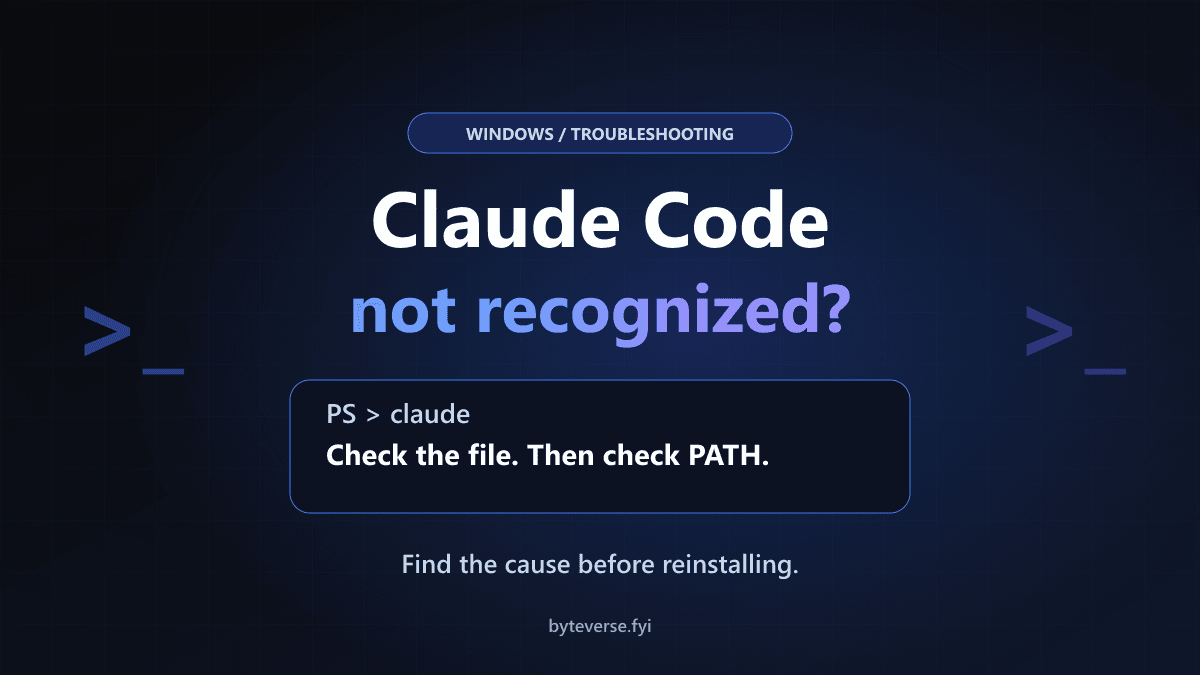
- 1Check file existence, full-path execution and command resolution separately before changing PATH.
- 2Use the actual installation method: standalone, WinGet, npm, VS Code extension and WSL do not share one command location.
- 3Repair only the diagnosed layer; a missing command is not a reason to reset credentials, weaken security or delete settings.
If Claude Code is not recognized on Windows, check two things separately: does the intended launcher exist, and can this terminal find it? The standalone Windows installer normally puts it at %USERPROFILE%\.local\bin\claude.exe. If that file runs by its full path but claude does not, investigate PATH or a conflicting command. If the file is missing, adding its folder to PATH cannot bring it back.
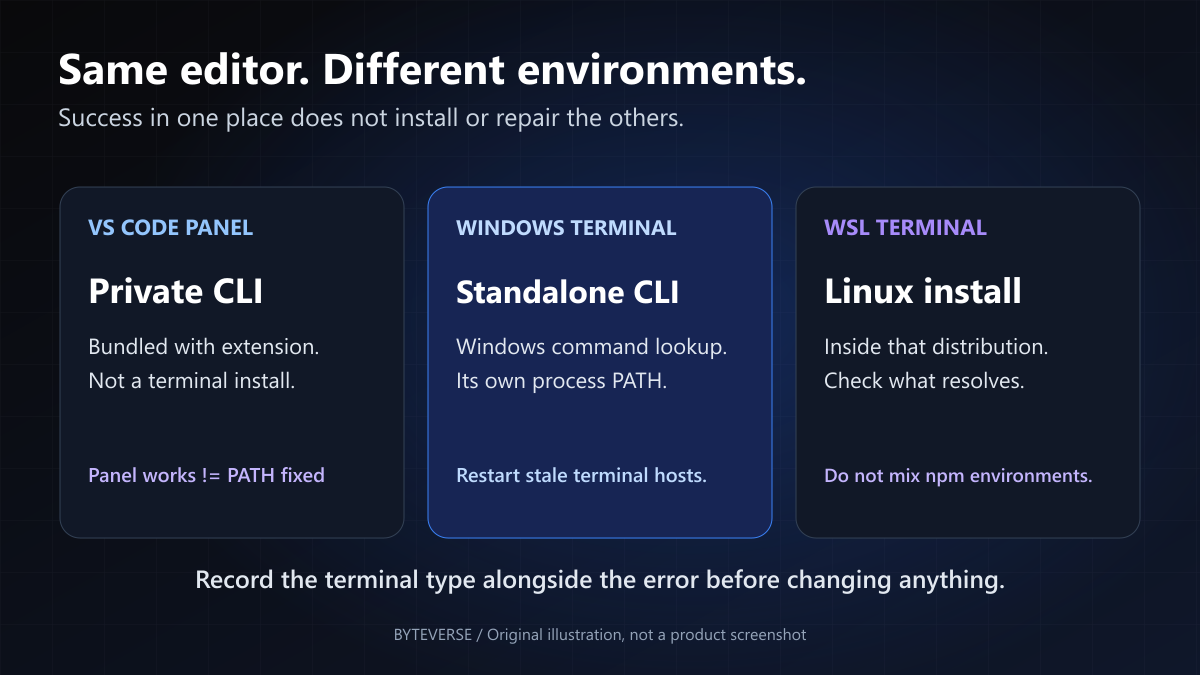
There is another common trap: a working Claude Code panel in VS Code does not mean the standalone terminal command is installed. The extension bundles a private CLI for its own panel.
This guide gives you a diagnosis before a repair. It covers native Windows PowerShell, installation-method differences, stale VS Code terminals and the separate WSL environment—not account or model errors after Claude has already started. For the broader product and workflow, see our Claude Code guide.
Documentation checked: October 9, 2026. Commands are labeled by shell. The nine PowerShell examples were syntax-checked in Windows PowerShell 5.1, and 29 controlled assertions checked command-resolution behavior. No live Claude installation or paid session was tested.
Quick diagnosis: match the evidence, not just the error
PowerShell may say The term 'claude' is not recognized as the name of a cmdlet. Command Prompt uses 'claude' is not recognized as an internal or external command. Bash often says claude: command not found. They describe failed command lookup, not one guaranteed underlying cause.
| What you observe | What it narrows down | Start here |
|---|---|---|
Full-path launcher prints a version; bare claude fails | PATH or command shadowing | Steps 1–2 |
| The native installer path is absent | No native install, a different method, or a missing file | Steps 3 and 5 |
| New external PowerShell works; VS Code terminal fails | Different or stale terminal environment | Step 4 |
VS Code chat panel works; neither terminal finds claude | Possibly extension-only installation | Step 4 |
| Command stopped working immediately after an update | Check whether the executable disappeared | Step 5 |
Error names claude.ps1 and says scripts are disabled | PowerShell found a launcher but policy blocked it | Step 3 |
| Claude reports a missing Git Bash/PowerShell shell | Claude started; its command-execution shell is the problem | Step 6 |
Typing claude opens the Desktop app | Another executable or alias is being selected | Steps 1–2 |
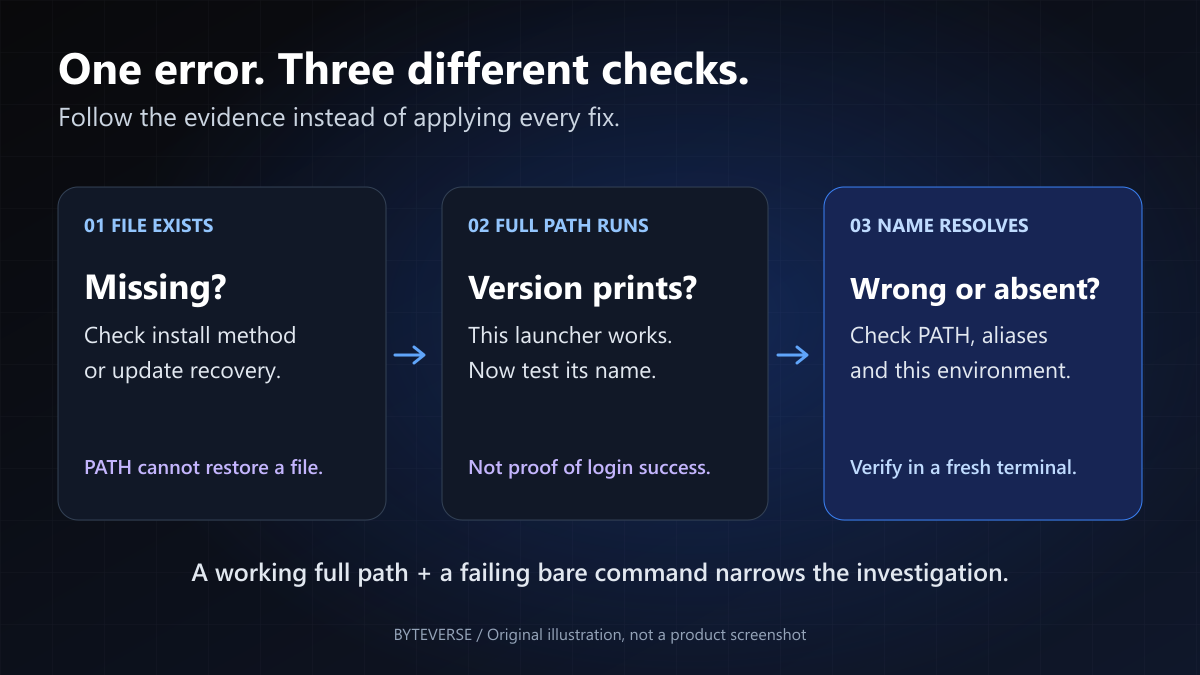
1. Check the file and the command separately
Open Windows PowerShell from Start, rather than beginning inside an existing editor terminal. Run these read-only checks:
Test-Path -LiteralPath "$env:USERPROFILE\.local\bin\claude.exe" -PathType Leaf
Get-Command claude -All -ErrorAction SilentlyContinue |
    Format-List CommandType, Name, Source, Path
where.exe claude
Read the output carefully:
TruefromTest-Path: a file exists at the standalone installer's expected location. That alone does not prove it is a working or trusted executable.False: nothing exists at that particular location. It does not prove there is no WinGet, npm, WSL or extension installation.Get-Commandreturns nothing: this PowerShell session cannot resolve that name. If it returns several entries, inspect which would run first.where.exeprints paths: use them as additional clues, not as a complete PowerShell diagnosis.
Why the .exe suffix? In PowerShell, where is normally an alias for Where-Object. Microsoft's command-precedence documentation explains aliases, functions and external commands. Also, where.exe searches the current directory as well as PATH; a file found only in the current directory does not prove PowerShell will run it by its bare name.
If you used the standalone native installer and the file exists at the expected location, test that launcher directly:
& "$env:USERPROFILE\.local\bin\claude.exe" --version
The leading & is PowerShell's call operator. It executes the quoted path correctly when a Windows username contains spaces. Keep the executable path and --version separate; quoting the entire command as one string is not the same operation.
A printed version is the useful dividing line. It confirms that particular launcher can execute. It does not prove login, billing, network access or every Claude feature works. If full-path execution also fails, follow the new error instead of repeatedly editing PATH. Only invoke a launcher from your known installation, not a similarly named file in a downloaded project.
2. Fix a proven PATH problem without replacing PATH
PATH is the list of directories a process uses to find commands. The installer, a fresh PowerShell window and an editor that has been open all day may not have the same list.
For a verified standalone native installation, test this temporary change:
$previousPath = $env:Path
$env:Path = "$env:USERPROFILE\.local\bin;$env:Path"
Get-Command claude -All |
    Format-List CommandType, Name, Source, Path
Inspect the result before running claude --version again. It should resolve to the intended launcher. This changes only this process and subsequently launched children, not your saved User PATH. Restore the previous value when finished, or close this diagnostic window:
$env:Path = $previousPath
If an Alias or Function named claude comes first, prepending a directory does not override it. Use the verified full path while investigating the specific alias or profile definition. Do not delete your entire PowerShell profile. If a path points to an old Claude Desktop registration and opens that app, Anthropic documents updating the Desktop app as the appropriate fix—not changing your API key.
If the directory was simply missing, persist that one entry using the steps below. If another executable was selected first, resolve that specific installation conflict instead: this temporary test put your directory first, while adding a new saved entry does not necessarily give it priority. Decide which installation you intend to keep and use its supported uninstall or repair process for the unwanted copy; do not delete arbitrary PATH entries.
- Search Start for Edit environment variables for your account.
- Under User variables, select Path, then Edit.
- Choose New and add the actual launcher directory. For the standalone installer, use the expanded location such as
C:\Users\YourName\.local\bin. - Preserve the existing entries. Add the directory, not the executable filename.
- Save, reopen the terminal host and run the lookup and version checks again.
Microsoft distinguishes process, User and Machine environment variables. A process-only fix is a useful experiment, not a persistent repair.
Avoid a copied setx PATH one-liner. Microsoft's setx reference documents a 1,024-character assignment limit, truncation and expansion of variable references. Replacing User PATH with the entire merged process PATH can also duplicate system entries. A targeted GUI edit is easier to inspect and undo.
3. Match the repair to the installation method
The phrase native binary describes the executable, not necessarily the installer you used. Current npm and WinGet installations also distribute native binaries. Their command locations are not automatically the standalone installer's location.
| Installation method | Where to investigate | Important distinction |
|---|---|---|
| Standalone Windows installer | %USERPROFILE%\.local\bin\claude.exe | The full-path examples above apply here |
| WinGet, usual user-scope portable layout | %LOCALAPPDATA%\Microsoft\WinGet\Links | Command links and package payloads are different |
| WinGet, usual machine-scope portable layout | %PROGRAMFILES%\WinGet\Links | Do not assume the user-scope location |
| Global npm on Windows | The actual result of npm.cmd prefix -g | Executable launchers sit directly in the prefix |
| VS Code extension only | Its private extension installation | It does not expose a general terminal command |
| Standalone installer inside WSL | ~/.local/bin/claude in that Linux distribution | Windows and WSL are different environments |
If you installed with WinGet
Check whether WinGet records the package:
winget list --id Anthropic.ClaudeCode --exact
An installed-package entry is not proof that the current terminal can resolve its launcher. Compare it with Get-Command and where.exe from step 1. Microsoft's portable-package design separates command links from the package storage directory. Defaults can vary with scope and configuration; some installs fall back to putting the package directory on PATH when a command link cannot be created.
If the expected link exists, invoke that verified full path with --version. If it works, investigate its containing directory in PATH—not an unrelated .local\bin entry. A missing link alone does not prove the installation is broken: check for the legitimate package-directory fallback before recommending repair. Microsoft's portable installer implementation documents that fallback. A missing or unusable recorded payload belongs with your approved WinGet repair process. Do not guess an executable in an arbitrary version folder or pile another installer on top without deciding which installation to keep.
If you installed with npm
Find the active global prefix and check the command launcher:
$npmPrefix = npm.cmd prefix -g
if ($LASTEXITCODE -ne 0 -or [string]::IsNullOrWhiteSpace($npmPrefix)) {
    throw 'Could not read the npm global prefix. Stop and check npm.'
}
Test-Path -LiteralPath (Join-Path $npmPrefix 'claude.cmd') -PathType Leaf
Run this only if npm is installed. The npm prefix command returns its configured global location; npm's folder documentation confirms that Windows global launchers are placed directly there. Do not append another \bin. If you changed Node versions or npm configuration, check whether you are inspecting a different prefix from the one originally used.
When that trusted launcher exists, test it explicitly:
& (Join-Path $npmPrefix 'claude.cmd') --version
If that full path works but bare lookup fails, investigate or add the actual npm prefix using step 2. If the launcher is missing, check the selected prefix and installed package before editing PATH.
If PowerShell specifically reports that claude.ps1 cannot run because scripts are disabled, command lookup already succeeded. Anthropic documents using claude.cmd instead of the PowerShell shim. This is an alternative invocation, not proof that bare claude has been repaired. It does not change execution policy; on a managed device, follow your organization's approved installation policy rather than trying to evade a software restriction.
Current setup documentation still supports npm and specifies Node.js 22 or later for installation. The installed Claude executable does not itself require Node at runtime. If optional dependencies or the postinstall step were blocked, the package can exist without a usable native binary. That is an installation-completeness problem, not something PATH alone repairs.
4. Separate the VS Code panel from its terminal
Anthropic's VS Code integration guide is explicit: the extension bundles a private CLI for its graphical panel, but installing it does not add claude to your shell PATH.
Panel works, no terminal works: check whether you ever installed the standalone CLI. You do not need to extract files from the extension directory or add its versioned folders to PATH.
External terminal works, integrated terminal fails: compare the same Get-Command claude -All output in both. Then:
- Save your work and close all VS Code windows.
- Reopen VS Code from a fresh environment. If
codeis available in a newly opened terminal where Claude works, launching the project withcode .gives the new editor process that environment. - Kill any restored integrated terminal and create a genuinely new one.
- Verify that its selected profile is the intended PowerShell, not WSL or another remote shell.
Why more than Reload Window? VS Code documents both environment inheritance between instances and persistent terminal sessions. Another running instance can supply its old environment, and a revived terminal can reuse its original one. A new-looking terminal tab is not always a clean environment test.
For editor navigation and terminal shortcuts, our VS Code tips guide is a useful companion. Avoid changing unrelated editor settings while testing a command-resolution problem.
5. Handle a missing executable after an update
If Claude worked yesterday and stopped immediately after an update, check file existence before making another PATH edit. The following location and backup procedure apply to the standalone native installer. WinGet and npm users should first follow their own installation branch above.
Anthropic documents a Windows updater failure where the old executable is renamed aside, but the replacement and rollback cannot complete. The folder may contain a backup named claude.exe.old. followed by a timestamp, while claude.exe itself is absent.
Inspect, without renaming anything:
Get-ChildItem -LiteralPath "$env:USERPROFILE\.local\bin" -Filter 'claude.exe.old.*' -File -ErrorAction SilentlyContinue |
    Sort-Object Name |
    Select-Object -Last 1 Name, Length
If the expected executable is missing and a backup from your known installation remains, follow the missing-executable recovery section in Anthropic's installation troubleshooting guide. Its recovery procedure restores the newest backup's name, then verifies the version. Stop first if an installer is still running, the file was quarantined, or the file's origin is uncertain. Do not rename an arbitrary downloaded executable into place.
No backup, an invalid binary, or a failed recovery calls for an approved reinstall. It does not call for deleting your projects or all Claude settings.
Install the standalone CLI only when that is the missing piece
For a new or repaired standalone Windows installation, Anthropic's current setup instructions provide this PowerShell command:
irm https://claude.ai/install.ps1 | iex
This downloads and executes an installer. It is not one of the read-only checks above. Confirm the official domain and use your organization's approved method. Run it in PowerShell, not Command Prompt; the native Windows installation does not require an Administrator terminal.
If you use WinGet instead, use its documented installation method rather than running both installers. If a command fails with HTML, a region notice, a proxy or TLS error, match that error in the official documentation. Do not turn off certificate verification or endpoint protection to force a download through.
After installation, open a new terminal and run claude --version. Once command resolution works, claude doctor provides installation and settings diagnostics. Review output before sharing it.
6. Keep Git Bash and WSL problems in their own branch
Current native-Windows shell requirements
As checked on October 9, Anthropic's setup documentation says Git for Windows is optional: Claude can use its PowerShell tool when Git Bash is absent. Git Bash enables Bash-based tooling. WSL is also not required for a native Windows installation.
Older guides or older binaries may present different requirements. If the installed version reports that it cannot find either Git for Windows or PowerShell, that message came from Claude after it started. Check the shell dependency rather than treating it as the original missing claude command.
For an intentional Git Bash setup, Anthropic documents CLAUDE_CODE_GIT_BASH_PATH. It must identify the actual shell executable, such as C:\Program Files\Git\bin\bash.exe, not the git-bash.exe terminal launcher. Verify your real Git installation and merge the setting into existing configuration; do not replace the entire settings file with a one-setting example.
A WSL terminal is a Linux environment
If VS Code's terminal is connected to a WSL distribution, use the Linux installation inside that distribution. In its Bash terminal, inspect:
command -v claude
type -a claude
A native Windows installation and a WSL installation are not interchangeable just because both terminals appear in VS Code. Windows paths can be imported into WSL, so inspect which command actually resolves. A Windows npm prefix is not a substitute for the Linux toolchain you meant to use.
Microsoft's WSL filesystem guidance explains why the environment and project location matter. Our Windows developer WSL setup guide covers that broader setup. An Exec format error is a loader/binary problem, not another spelling of command not found.
Finish with a repeatable success check
The repair is complete for this issue when a new terminal in the environment you actually use resolves and runs the intended launcher. Normally that means claude --version; if you deliberately kept npm's CMD-shim alternative, verify claude.cmd --version instead and keep using that spelling. Do not report the bare name as repaired if it still selects a blocked script. A later login or API error is a separate problem; changing PATH again is unlikely to address it.
If you need help, provide this small, redacted report:
- Windows version and terminal type: external PowerShell, VS Code PowerShell, or a named WSL distribution.
- Installation method and whether the command ever worked.
- Exact error text, including whether it appeared after an update.
- File-existence result and the redacted command location selected by
Get-Command. - Whether full-path
--versionworks and whether a new external terminal behaves differently.
Do not post API keys, login codes, complete environment dumps or your entire Claude configuration. A missing terminal command is not a reason to reset credentials, disable antivirus, weaken execution policy or delete session history.
If you were using GitHub Copilot's chat panel with a Claude model, rather than Anthropic's Claude Code extension or CLI, start with our GitHub Copilot troubleshooting guide. A model name does not identify which application owns the failure.
Frequently Asked Questions
Why is Claude Code not recognized after a successful install?
The current terminal may still have an old PATH, the intended install directory may be missing from PATH, or the executable may not be present. Check file existence and full path execution separately. A successful installer message or installed package entry is not enough to establish that this terminal can resolve the command.
Why does Claude work in the VS Code extension but not the terminal?
The extension includes a private CLI for its panel and does not add the standalone command to PATH. Install the standalone CLI if you need terminal access. If a new external terminal already works, fully restart VS Code, create a fresh terminal and check that it is not connected to a different WSL or remote environment.
Do I need Git Bash or WSL to run Claude Code on Windows?
Not for the current native Windows setup documented on October 9, 2026. Git for Windows is optional, and Claude can use PowerShell when Git Bash is absent. Git Bash is useful for Bash tooling; WSL is a separate option for Linux workflows. Match any dependency error to the version and environment you actually run.
How do I handle the claude.ps1 scripts-disabled error?
That error means PowerShell found an npm script launcher but refused to execute it under the current policy. For an approved npm installation, Anthropic documents calling the corresponding claude.cmd launcher instead. First verify its location; changing execution policy or adding a nonexistent folder to PATH is not the default repair.
Will a paid Claude plan fix command not found?
No. Shell command lookup happens before Claude can authenticate an account. A paid plan does not install the terminal launcher or repair PATH. First make the intended executable run; then handle any account access or login message separately.
Verification Notes
Nine exact PowerShell blocks were syntax-checked in Windows PowerShell 5.1.26100.9549. A locally compiled harmless launcher and synthetic npm shims supported 29 assertions: missing file versus directory, invalid executable, paths containing spaces, executable/alias/function precedence, current-directory lookup differences, process PATH restoration and child inheritance, npm-prefix failure, explicit CMD-shim invocation and backup inspection. No installer, real Claude, WinGet package operation, WSL session or persistent environment/security-policy change was executed. In particular, running a CMD shim was tested; reproducing a policy-blocked PowerShell shim was not. These are command-resolution tests, not live Claude installation or authentication tests. No real API keys or customer data were used. The diagrams are original explanations, not screenshots of a completed installation.
Sources and Image Credits
Primary documentation reviewed October 9, 2026: Anthropic's setup and requirements, installation troubleshooting and VS Code integration; Microsoft PowerShell command precedence, environment variables, where, setx and WSL filesystems; VS Code terminal behavior; npm folders and global prefix; and Microsoft's WinGet portable-package specification.
Cover, diagnostic map and terminal-environment diagram: ByteVerse original illustrations. Product names identify the software discussed; this is an independent troubleshooting guide, not an Anthropic endorsement.
Share this article
Written by
Ali RehmanAuthor at ByteVerse
A Full Stack Developer and Tech Writer specializing in React.js, Next.js, and modern JavaScript, sharing insights on web development, frontend technologies, backend APIs, and scalable applications.
View all posts