Gemini Not Showing in Google Docs or Gmail? 7 Checks Before You Pay
No Ask Gemini button in Docs, Sheets or Gmail? Work through the five account-level gates that hide it: plan tier, account age, Workspace smart features, account language and administrator switches, with Google's current plan tables, before paying for an upgrade.
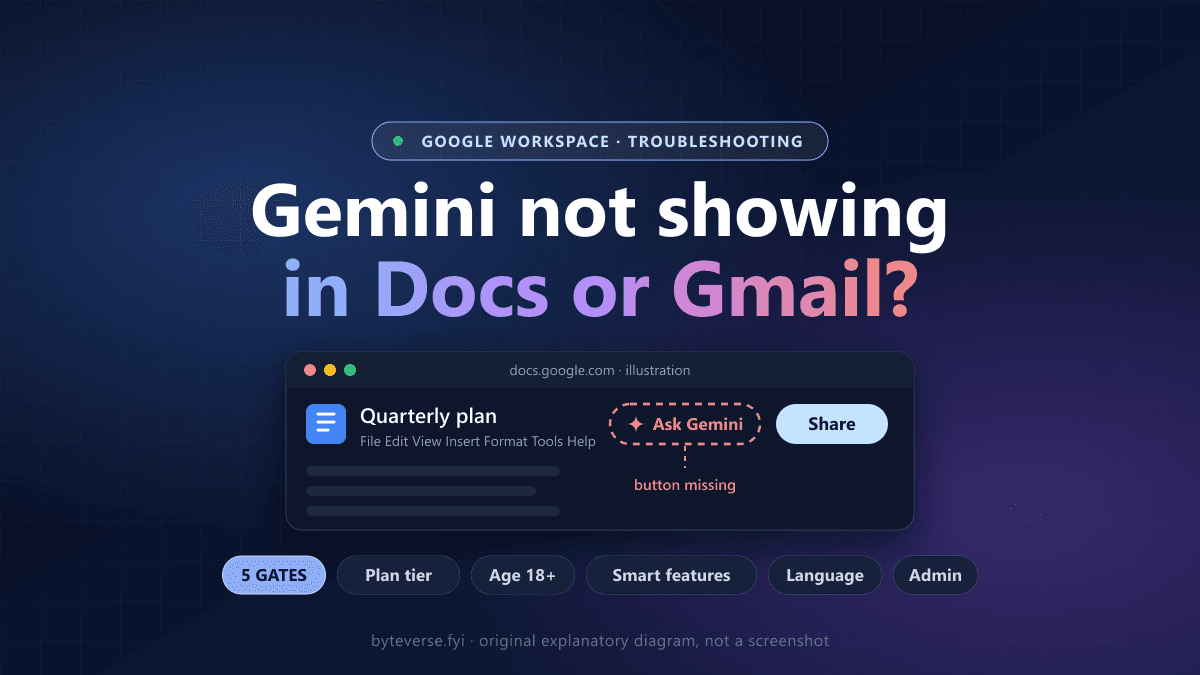
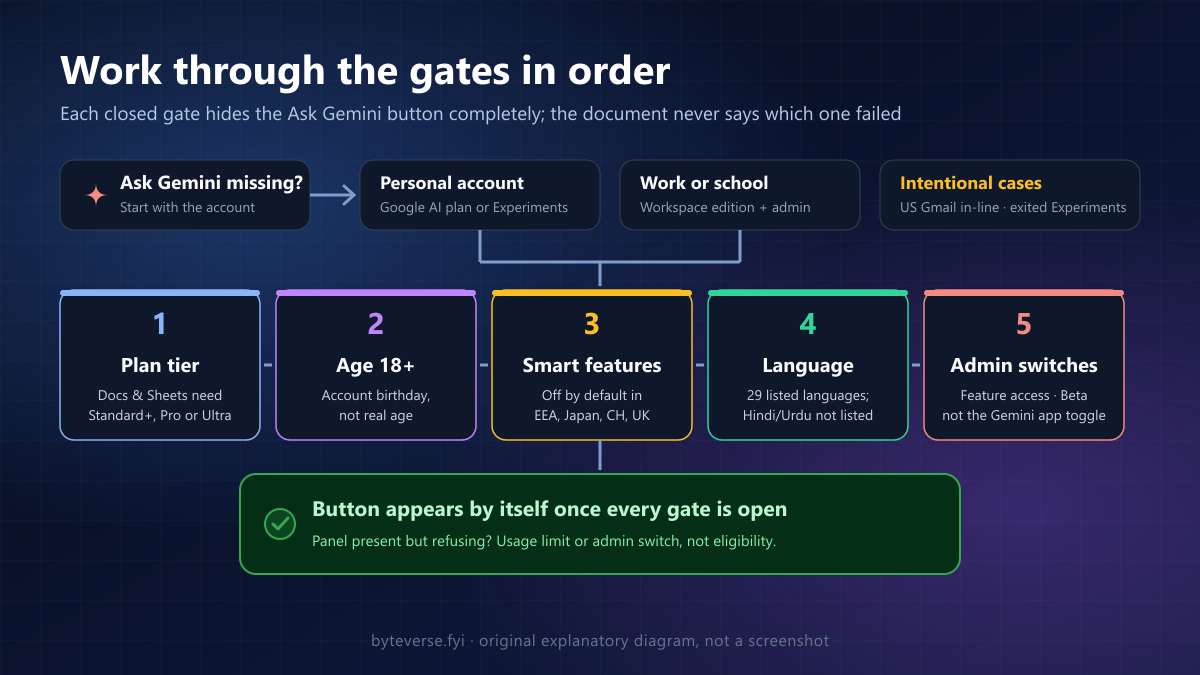
- 1The Ask Gemini button only renders when the signed-in account passes five gates: an eligible plan tier for that specific app, age 18 or over, the Smart features in Google Workspace setting, a supported account language and any administrator controls.
- 2Gmail and Docs are gated separately: Business Starter, Frontline Plus and Google AI Plus list Gmail features but no Docs or Sheets features, so Gmail yes and Docs no is usually the plan working as described.
- 3Some missing panels are intentional: US Google AI Pro and Ultra subscribers may lose the Gmail side panel to in-line features, exiting Workspace Experiments is permanent, and mobile apps show a subset.
If Gemini is not showing in Google Docs, Sheets or Gmail, the missing piece is almost always one of five account-level conditions, not a broken app: the plan tier attached to your account, the age on that account, a privacy setting called Smart features in Google Workspace, the language your Google Account is set to, or a switch your administrator controls. The Ask Gemini button simply does not render until every one of those conditions is met, and nothing inside the document tells you which one failed.
That is why the usual advice of clearing the cache or reinstalling the browser rarely helps. This guide walks through the checks in the order that resolves the most cases first, using Google's current eligibility pages, so you can find the real cause before paying for an upgrade you may not need.
Scope: this is a documentation-based guide for the web versions of Gmail, Docs and Sheets plus the Docs mobile app, checked against Google's help pages on October 7, 2026. Plan contents and rollouts change; the comparison table below reflects Google's published list on that date, and every claim about a plan links to the page it came from. No test subscriptions were purchased for this article.
First, identify the symptom
In the web apps, Gemini lives in one place: at the top right of Gmail, Docs or Sheets, Google's help pages say to click Ask Gemini. Google's own eligibility check is the same test you are about to run: look for that icon, and if it is present, you have access. In the Docs Android app it is also at the top right, and the panel opens at the bottom of the screen instead of the side. If you want a tour of what the panel does once it appears, our complete guide to using Google Gemini covers the Workspace side panel alongside the standalone app.
Before changing anything, write down which of these three situations you are in, because they point to different causes:
- No Gemini button anywhere, in any app. Usually eligibility: plan, age, smart features or language. Work through checks 1 to 5.
- Gemini shows in Gmail but not in Docs or Sheets. Usually a tier limit. Several plans include Gmail features but not the Docs and Sheets panel. Check 2 explains which.
- The button is there, but Gemini says the feature is unavailable or turned off. Usually a setting: smart features (check 4) or an administrator control (check 6).
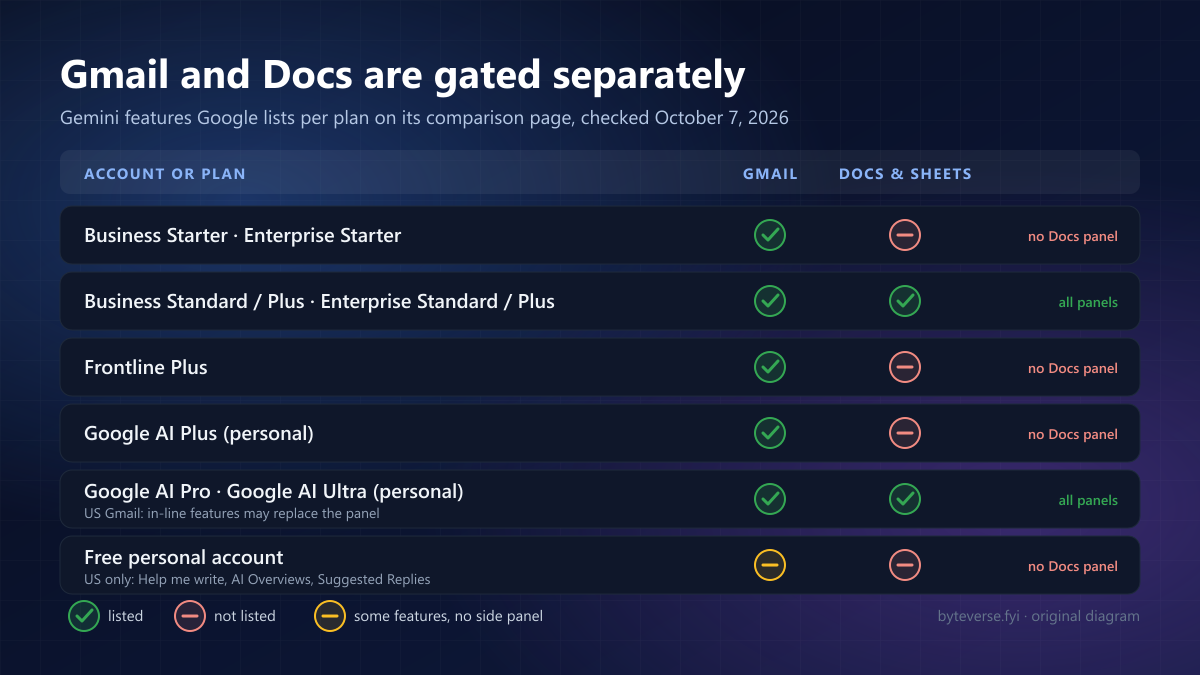
The table summarizes what Google's Get started with Google Workspace with Gemini page listed on October 7, 2026. "Listed" means the page names at least one Gemini feature for that app and plan; "not listed" means it names none.
| Account or plan | Gmail Gemini features | Docs and Sheets Gemini features | What to expect |
|---|---|---|---|
| Business Starter or Enterprise Starter | Listed (Help me write, Proofread, Suggested replies, Summarize and draft) | Not listed | Gmail help without a Docs or Sheets panel is normal here |
| Business Standard, Business Plus, Enterprise Standard, Enterprise Plus | Listed | Listed | All panels should appear once settings and language pass |
| Frontline Plus | Listed | Not listed | Same pattern as Starter |
| Google AI Plus (personal) | Listed | Not listed | Gmail only; Docs and Sheets need Pro or Ultra |
| Google AI Pro or Ultra (personal) | Listed, with a US side-panel exception (check 7) | Listed | Full access, subject to usage limits |
| Free personal account | Some Gmail features at no charge in the US only | Not listed | Workspace Experiments is the only documented free route (check 7) |
1. Confirm the account, not the document
Gemini eligibility belongs to the account that is signed in, not to the file. A document shared by a colleague on an Enterprise Standard plan will not show you a panel if your own account is on Business Starter, and the reverse is also true. Click your profile picture at the top right of the Docs tab and read which account that tab is actually using. Browsers with several Google accounts open regularly load a document under the wrong one, especially when a link was opened from an email.
Check Gmail and Docs separately. Because the apps are gated by different rows in Google's table, "Gemini works in my Gmail" is not evidence that Docs or Sheets should show it. Likewise, a personal account that joined Workspace Experiments can show the panel in Docs while a colleague's work account on the same screen does not.
If you manage several Chrome profiles, repeat the test inside the profile that belongs to the paid or work account. Signing in to a second account inside an existing profile keeps the first account as the default for many links.
2. Match the plan tier to the app you are opening
This is the single most common reason for the "Gmail yes, Docs no" symptom, and it is worth reading Google's comparison page directly rather than relying on a plan name.
Personal accounts. Google's page lists Gemini in Gmail for Google AI Plus, Pro and Ultra, but lists the Docs, Sheets, Drive and Slides features only for Pro and Ultra. If you upgraded to Plus expecting Docs help, the missing panel is the plan working as described. You can see which plan your account holds on your Google One plans page; the Google AI Pro benefits page lists "Gemini in Gmail, Docs, Vids, and more" as a Pro benefit and points to the same comparison table for the exact split.
Work and school accounts. The edition decides. Google lists Docs features such as Help me write, Summarize a document and Write and edit for Business Standard and Plus and Enterprise Standard and Plus, and lists none of them for Business Starter, Enterprise Starter or Frontline Plus. Gmail features such as Help me write and Summarize and draft emails are listed for the Starter editions, which is exactly why Starter users see Gemini in email but not in documents. Your administrator can read the edition in the Admin console; Google also sells an AI Expanded Access add-on for business and enterprise users, so ask whether that or an edition change is the intended route rather than assuming.
The Sheets panel follows the Docs rows: the AI function, enhanced Smart Fill and data-insight features are listed for Standard and Plus editions and for Pro and Ultra, not for Starter or Plus. If spreadsheets are the main reason you want the panel, our guide to using AI in Excel and Google Sheets separates the built-in Gemini features from add-ons that work on any plan.
One more distinction saves money: a usage limit is not a missing button. If the panel appears but refuses with a limit message, Google's AI usage limits page says daily limits reset at 12 AM Pacific Time and monthly limits reset on the first of the month, and that limits do not roll over and cannot be shared with other people. Nothing about your eligibility is wrong in that case; wait for the reset or ask about the add-on.
3. Check the age on the account
Google's requirements page puts one line above the plan requirements: you must be 18 or over. The age that matters is the birthday stored on the Google Account, not your real age, and a child account managed through Family Link cannot meet that rule regardless of plan.
You can see the stored birthday under Personal info in your Google Account. If it is wrong, correct it there; Google may ask for verification when a birthday change moves an account across an age boundary, so allow time for that rather than expecting the panel to appear instantly. Workspace Experiments, the free personal-account route in check 7, carries the same 18+ requirement.
4. Turn on Smart features in Google Workspace
The administrator page for Gemini in Workspace services ends with a note that is easy to miss: to access Gemini in Workspace services, users need to turn on smart features and personalization. Google's smart features page then names the exact control: the Smart features in Google Workspace setting is what provides "Google Workspace with Gemini". Its sibling, Smart features in Gmail, Chat and Meet, governs Smart Compose and summary cards; turning on only that one does not bring Gemini back.
Two facts make this the most frequently overlooked cause. First, Google states that smart feature settings are off by default if you live in the European Economic Area, Japan, Switzerland or the United Kingdom, so a brand-new account in those regions starts without Gemini even on an eligible plan. Second, outside the Gmail app the Workspace-wide setting can only be turned on from a web browser, so a user who lives in the Docs or Drive mobile apps may never see the switch.
The path on a computer, from Google's instructions:
- Open Gmail and click Settings, then See all settings.
- On the General tab, scroll to Google Workspace smart features and click Manage Workspace smart feature settings.
- Turn on Smart features in Google Workspace, then click Save at the bottom right.
The same panel is reachable from Drive under Settings, then Privacy, then Manage Workspace smart feature settings. Changes apply across every device where you are signed in. If you keep several Gmail or Docs tabs open, reload them; Google's admin guidance says open windows need a refresh before a settings change shows everywhere.
For work accounts, an administrator can set a default for the organization under Account settings, then Smart features for Google Workspace, but Google's page is explicit that users can override that default in their own settings. If your administrator chose "Don't set a default experience", each user has to make the choice above personally, and Google says the change can take up to 24 hours to propagate, although it usually happens faster.
5. Set a supported Google Account language
Google's requirements page says some AI features may not be available in your language and that the fix is to switch to a supported language in your Google Account. The supported-languages page lists the Gemini side panel in Docs, Sheets and Gmail for 29 languages: Arabic, Catalan, Chinese, Czech, Danish, Dutch, English, Finnish, French, German, Greek, Hebrew, Hungarian, Indonesian, Italian, Japanese, Korean, Malay, Norwegian, Polish, Portuguese, Romanian, Russian, Spanish, Swedish, Thai, Turkish, Ukrainian and Vietnamese. Hindi and Urdu are not on that list on the date this was checked, which matters for a large share of accounts in South Asia whose language was set at sign-up.
Individual features are narrower than the panel. Help me write in Gmail is listed for eight languages, and for personal accounts only in the US; Proofread is listed for English and Spanish; and Google says every feature not named on that page is English-only, with the instruction to set your Google Account language to English. So the sequence is: change the account language, reload the app, and check for the button again before concluding the plan is wrong. The language setting lives in your Google Account under Personal info, and it changes the interface language across Google products, not just the Workspace app you are testing.
6. Ask the administrator about three different switches
On a work or school account, "the admin turned Gemini off" can mean three unrelated controls, and asking about the wrong one produces a confident but useless "it's on".
Feature access per app. Google's page on managing access to Gemini features in Workspace services describes an Admin console path, Generative AI, then Gemini for Workspace, then Feature access, where Gemini and the side panel can be turned on or off for Gmail, Calendar, the Drive and Docs family (Sheets, Slides, Forms, Drawings and Vids), Meet, Chat and Workspace Studio, per organizational unit or group. The default is on. The page lists this control for Enterprise Standard and Enterprise Plus, the Teaching and Learning add-on, Education Plus and Google AI Pro for Education. On Business editions the panel simply may not offer it, so a missing button there points back to tier, smart features or language rather than to this switch.
The Gemini app toggle is separate. Google states that turning access to the Gemini app at gemini.google.com on or off has no effect on the other AI features in Workspace services. An administrator who reports "Gemini is enabled" after checking the app setting has not confirmed the Docs panel, and one who disabled the app has not thereby removed Gemini from Gmail.
Beta features are a third program. Google's Gemini Beta page, formerly called Gemini Alpha, says Beta features are off by default and only an administrator can turn them on, for everyone or for specific organizational units and groups. Some Docs capabilities are listed there, so a feature a colleague at another company demonstrates may be a Beta feature your organization never enabled, even though the ordinary panel works.
Whichever control changed, Google notes that administrator settings can take up to 24 hours to apply. If the Admin console does not show the control your administrator expects, the supported route is to open the Help menu inside the Admin console and contact Workspace support from there, because support can see the edition and entitlements behind the console.
7. Know when a missing panel is intentional
Three situations look like failures and are not.
US Gmail subscribers. Google's comparison page carries a footnote that Google AI Pro and Ultra subscribers in the US may no longer see Ask Gemini in Gmail or be able to open the Gemini in Gmail side panel, because Google is moving to in-line experiences such as AI Overviews and Help me write directly in the product. If you are in the US on one of those plans and the Gmail panel vanished while Docs still works, that is the documented change, and no setting restores the old panel.
Workspace Experiments has permanent exits. Workspace Experiments is Google's trusted-tester program that gives personal accounts early access to AI features, including the Gemini panel in Docs and Gmail, in more than 170 countries and territories, and it is listed as unavailable for Google Workspace accounts. Google says features there roll out gradually and might not be available to you yet, that English-only features require English as the account language, and, critically, that if you exit the program you permanently lose access and cannot rejoin. A personal account that once had Gemini in Docs for free and then "lost" it may have left the program.
Mobile apps show a subset. The Docs app on Android and iPhone has its own Ask Gemini entry with a smaller set of actions, and the Workspace smart feature settings can only be turned on from a web browser or the Gmail app. Fix the account in a browser first, then look at the phone.
Only after those checks is it worth ruling out the browser, and this part is general troubleshooting rather than a Google rule: open the document in an incognito or private window with extensions disabled, and make sure the browser is current. If the button appears there, an extension or a stale session was hiding it; if it does not, the cause is one of the account conditions above, and no amount of cache clearing will change it.
What a useful final result looks like
A finished diagnosis names the gate that was closed and the action that opens it:
- Tier: Gmail shows Gemini, Docs does not, account is Business Starter, Frontline Plus or Google AI Plus. The fix is an edition or plan change, or the AI Expanded Access add-on, decided with the comparison table open.
- Age: account birthday under 18 or a supervised account. Correct the record or use an eligible account.
- Smart features: EEA, Japan, Switzerland or UK account, or an organization without a default. Turn on Smart features in Google Workspace in a browser and reload.
- Language: account language not on Google's list, often Hindi or Urdu. Switch to English or another listed language.
- Administrator: Feature access off for Drive and Docs, or a Beta feature never enabled. Ask about the specific switch, not "Gemini".
- Intentional: US Gmail in-line change, an exited Experiments account or a mobile-only view.
Do not buy Google AI Plus to get Docs help, do not upgrade anything before checks 3 to 5, and do not expect a reinstall to change an account-level gate. If the same confusion is happening on the Microsoft side of your office, the pattern is identical and our guide to Copilot in Excel not showing walks through the license labels there. And if your edition will never include the Docs panel and email drafting is the real need, the comparison in our roundup of AI email assistants covers tools that work on any plan.
Frequently Asked Questions
How do I enable Gemini in Google Docs?
There is no single "enable Gemini" switch for users. Google's requirements are an account that is 18 or over, an eligible plan (Business Standard or higher, Enterprise Standard or higher, or Google AI Pro or Ultra for personal accounts), the Smart features in Google Workspace setting turned on, and a Google Account language on the supported list. When all four are true, the Ask Gemini button appears at the top right of the document by itself.
Why does Gemini show in Gmail but not in Google Docs or Sheets?
Because Google gates the apps separately. On October 7, 2026, Google's comparison page listed Gmail features for Business Starter, Enterprise Starter, Frontline Plus and Google AI Plus, but listed no Docs or Sheets features for any of them. Those features are listed only for Business and Enterprise Standard and Plus and for Google AI Pro and Ultra.
Does Google AI Plus include Gemini in Google Docs?
Not according to Google's comparison table on the date this guide was checked. Google AI Plus is listed for Gmail features such as Help me write, Proofread, Suggested replies and Summarize and draft emails, while the Docs, Sheets, Drive and Slides features are listed for Google AI Pro and Google AI Ultra only.
Why did Ask Gemini disappear from my Gmail?
Check three things. Google says Google AI Pro and Ultra subscribers in the US may no longer see Ask Gemini in Gmail as inline AI features replace the side panel. The Smart features in Google Workspace setting may have been turned off, which removes the panel while leaving Gmail working. And a personal account that exited Workspace Experiments loses those features permanently.
Can I use Gemini in Google Docs for free?
On a personal account the only route Google documents is Workspace Experiments, a trusted tester program for people 18 or over in more than 170 countries and territories that is not available for Google Workspace accounts and whose features roll out gradually. Separately, Google lists Help me write, AI Overviews for email threads and Suggested Replies in Gmail at no charge for personal accounts in the US. Otherwise, Docs and Sheets features require Google AI Pro or Ultra, or an eligible Workspace edition.
Sources and Image Credits
Google documentation checked October 7, 2026:
- Get started with Google Workspace with Gemini: requirements, edition and Google AI plan comparison, US Gmail footnote.
- Collaborate with Gemini in Google Docs: where the Ask Gemini button is, availability notes.
- Collaborate with Gemini in Gmail.
- Collaborate with Gemini in Google Sheets.
- Supported languages for Google Workspace with Gemini.
- Smart features and controls for Google Workspace and other Google products: settings paths and regional defaults.
- Manage access to Gemini features in Workspace services (administrator).
- Manage Google Workspace smart features for your users (administrator).
- Turn access to Google Workspace with Gemini Beta on or off (administrator).
- About AI usage limits (administrator).
- Get started with Google Workspace Experiments and where Workspace Experiments is available.
- Use Google AI Pro benefits.
The cover and two diagrams are ByteVerse original illustrations. They summarize Google's published eligibility rules as of the date above; they are not screenshots of Google products, not a guarantee that a particular account will gain access, and not a claim of endorsement by Google.
Share this article
Written by
Ali RehmanAuthor at ByteVerse
A Full Stack Developer and Tech Writer specializing in React.js, Next.js, and modern JavaScript, sharing insights on web development, frontend technologies, backend APIs, and scalable applications.
View all posts