ollama ps Explained: What SIZE, PROCESSOR and UNTIL Mean
Every column of ollama ps explained from the Ollama 0.40.16 source: what SIZE and PROCESSOR measure, how the UNTIL countdown works, why it reads 4 minutes from now or Stopping, and seven reasons the list can be empty.
- 1ollama ps lists the models loaded in memory; SIZE is memory in use, PROCESSOR is the CPU and GPU split with the CPU share first, and UNTIL is the time before unloading
- 2UNTIL cuts minutes instead of rounding, so a fresh five minute timer reads 4 minutes from now, and Stopping means the expiry time has passed while a reply is still running
- 3An empty table is normal once the keep-alive runs out; other causes are a different server, a cloud model or a name filter that matches nothing
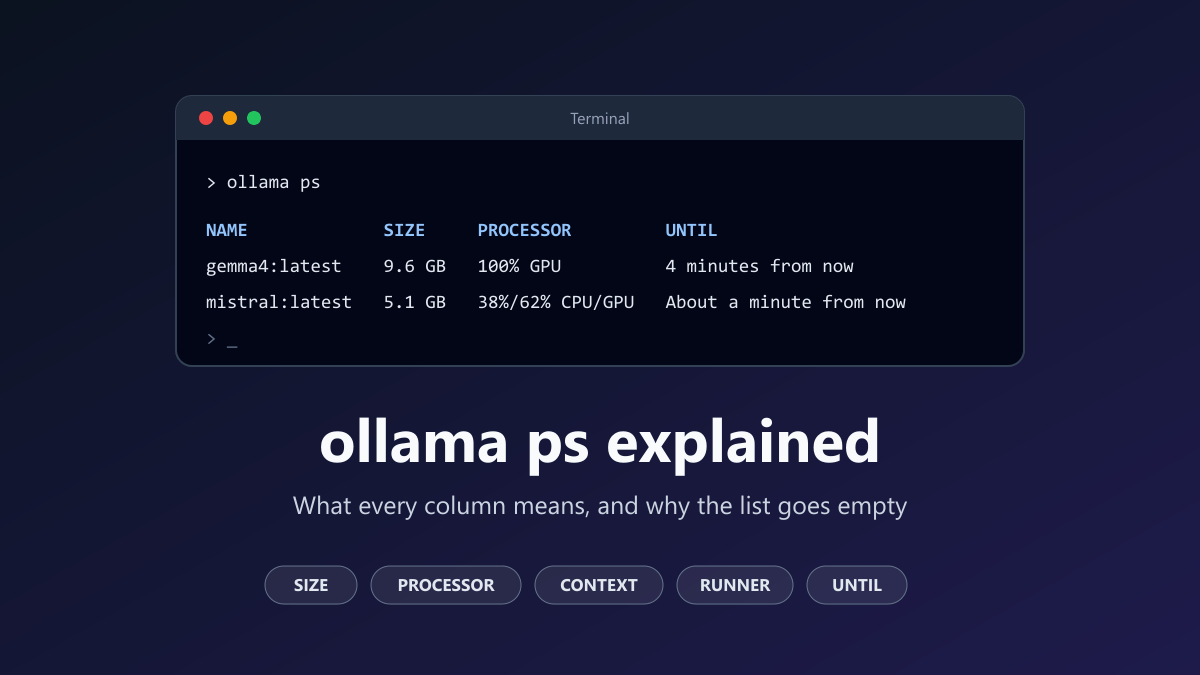
ollama ps lists the models that are loaded in memory right now, one row for each. SIZE is the memory the loaded model takes up. PROCESSOR is how that memory is divided between CPU and GPU. CONTEXT is the context length it was loaded with, and UNTIL is when Ollama plans to unload it. An empty list means nothing is loaded, which is normal five minutes after your last request.
The official CLI reference gives this command one heading and one line. That leaves people asking what "4 minutes from now" means, as in this GitHub issue, or why the table went blank.
To answer exactly, I read the source code of Ollama 0.40.16, the latest release on 19 November 2026, and compared it with older releases to see when each column arrived. If you have not installed Ollama yet, start with the guide to running AI locally.
What ollama ps prints
Load a model, for example with ollama run, then open a second terminal and type:
ollama ps
In Ollama 0.40 the table has seven columns:
NAME              ID              SIZE      PROCESSOR          CONTEXT    RUNNER      UNTIL
gemma4:latest     c6eb396dbd59    9.6 GB    100% GPU           4096       llamacpp    4 minutes from now
mistral:latest    2ae6f6dd7a3d    5.1 GB    38%/62% CPU/GPU    4096       llamacpp    About a minute from now
These two rows are an example of the layout. I built them from the format in the command source. They are not copied from a running machine.
| Column | What it tells you |
|---|---|
| NAME | The model and its tag |
| ID | The first 12 characters of the model digest |
| SIZE | Memory the loaded model occupies, in decimal units |
| PROCESSOR | How that memory is divided between CPU and GPU |
| CONTEXT | The context length this copy was loaded with, in tokens |
| RUNNER | The engine that runs the model |
| UNTIL | When Ollama will unload the model |
Rows are sorted by UNTIL. The model that will stay loaded longest is at the top.
Your table may have fewer columns, because the command has grown over time:
| Ollama release | Columns in the table |
|---|---|
| 0.1.38 to 0.9.6 | NAME, ID, SIZE, PROCESSOR, UNTIL |
| 0.10.0 to 0.35.1 | CONTEXT added after PROCESSOR |
| 0.40.0 and newer | RUNNER added before UNTIL |
The command first shipped in release 0.1.38. CONTEXT arrived with 0.10.0, and RUNNER with 0.40.0. Run ollama -v to see which version you have.
NAME and ID
NAME is the model name in its shortest form with the tag, such as llama3.2:latest. ID is the first 12 characters of the model digest. It is shortened the same way as the ID in ollama list.
The command also accepts a name. ollama ps mistral prints only the rows whose NAME starts with "mistral". This filter is in the source but the help text does not mention it. It matches from the first character and it is case-sensitive, so ollama ps latest and ollama ps Mistral both find nothing.
SIZE is memory in use, not the download size
SIZE in ollama ps and SIZE in ollama list measure different things. The list command reports how much disk space the model files take. The ps command reports how much memory the loaded model occupies.
For models served by the llama.cpp runner, the number is the total that the runner reports after loading. If that report is missing, Ollama falls back to the size of the model file. You can see both paths in the runner source.
The official context length page says a larger context needs more memory. That is why the same model can show a bigger SIZE after you raise its context length.
Three details help when you compare SIZE with other tools:
- Units are decimal. 1 GB is 1,000,000,000 bytes.
nvidia-smireports MiB, where 1 MiB is 1,048,576 bytes, so a SIZE of 5.1 GB is about 4,864 MiB. - Values of 10 or more are cut to a whole number without rounding. 42.9 GB is shown as 42 GB. Smaller values keep one decimal place.
- SIZE covers the whole model. When PROCESSOR shows a split, the graphics card holds only its share.
PROCESSOR shows where the model was loaded
The server reports two numbers for every loaded model: the total size, and the part of it that sits in GPU memory. The command turns those two numbers into a label.
| Condition | PROCESSOR shows |
|---|---|
| Nothing is in GPU memory | 100% CPU |
| The GPU part equals the total | 100% GPU |
| The GPU part is smaller than the total | A split such as 38%/62% CPU/GPU |
| The GPU part is larger than the total | Unknown |
In a split, the CPU share comes first. 38%/62% CPU/GPU means 38% of the model is in system memory and 62% is on the graphics card. It is easy to read it the other way round.
Take the second row of the example. The total is 5,137,025,024 bytes and the GPU part is 3,184,955,515 bytes. The remaining 1,952,069,509 bytes are 38% of the total. The CPU share is rounded to a whole percent, and the GPU share is whatever is left.
Two things are worth knowing about 100% GPU. In the 0.40.16 llama.cpp runner, a model is reported as fully on the GPU when all of its layers were offloaded there. And the label describes how memory was placed when the model loaded. It is not a live usage meter.
That second point explains reports like this one, where the table said 100% GPU while the CPU did the work. If the label and the speed disagree, check real GPU activity with Task Manager or nvidia-smi. The guide to Ollama not using the GPU on Windows goes through that step by step.
CONTEXT and RUNNER
CONTEXT is the context length this loaded copy is using, counted in tokens. It can be lower than the maximum that ollama show lists for the model, because the default depends on your hardware. The context length page gives 4k tokens below 24 GiB of VRAM, 32k from 24 to 48 GiB, and 256k at 48 GiB or more.
You can change it with the OLLAMA_CONTEXT_LENGTH variable or with the slider in the app settings. Check SIZE and PROCESSOR again afterwards, since a longer context can push part of the model off the GPU. A dash in this column means the model has no text context, which is the case for speech-only models.
RUNNER names the engine. llamacpp means a llama.cpp server process is running the model. mlx is Apple's MLX engine, the first choice on Apple Silicon Macs when a model offers it. ggml is the tag for models created by what the source calls the legacy path.
UNTIL and the keep-alive countdown
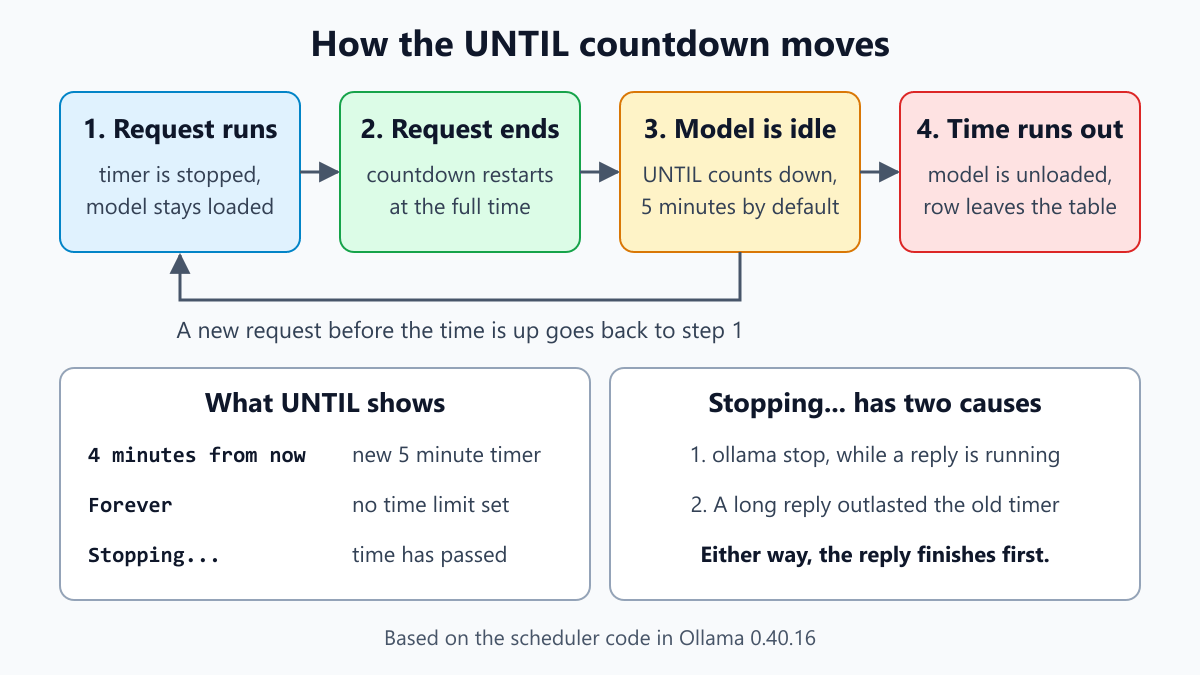
After a request, Ollama holds the model in memory so the next one starts fast. By default it waits five minutes, as the FAQ explains. UNTIL shows how much of that time is left.
The wording comes from a small formatting function, and its rounding surprises people:
| Time left | UNTIL shows |
|---|---|
| Keep-alive is negative | Forever |
| 2 days 5 hours | 2 days from now |
| 23 hours 40 minutes | 24 hours from now |
| 1 hour 20 minutes | About an hour from now |
| 59 minutes 59 seconds | 59 minutes from now |
| 4 minutes 59 seconds | 4 minutes from now |
| 1 minute 30 seconds | About a minute from now |
| 45 seconds | 45 seconds from now |
| The time has passed | Stopping... |
Minutes are cut, not rounded. That is why a fresh five-minute timer reads "4 minutes from now". By the time you run the command, 4 minutes and 59 seconds are left. Nothing is wrong, and your setting has not been ignored. Hours are rounded instead, so 23 hours 40 minutes reads as 24 hours.
The countdown follows five rules in the scheduler source:
- When a model loads, the keep-alive comes from the request if it carries one. Otherwise the server setting
OLLAMA_KEEP_ALIVEapplies, and without that, five minutes. - While a request is running, the timer is stopped. A busy model is not unloaded.
- When the last running request finishes, the countdown starts again from the full keep-alive.
- A later request that carries its own keep-alive replaces the value. A request without one leaves it alone.
- Once the model is unloaded, the next load starts again at rule 1.
Rule 5 explains a GitHub report where a model started with a negative keep-alive showed Forever, yet the next run was back to four minutes. The setting belonged to the loaded copy, and it went away with it.
Why UNTIL says Stopping...
Stopping... appears whenever the expiry time is already in the past. Reading the scheduler code, there are two ways to get there.
The first is deliberate. ollama stop, added in release 0.3.11, sets the expiry time to now. So does an API request with an empty prompt and a keep-alive of 0. An idle model is unloaded right away and its row disappears. A model that is still answering is not interrupted. It stays in the list as Stopping... until that answer ends, and then it unloads.
The second is a side effect. The expiry time is written when a request finishes, and it is not updated when a new request starts. If a long generation runs past the old time, UNTIL reads Stopping... although the model is hard at work. It will not be unloaded in the middle of an answer. Once the request finishes, the countdown restarts and the label goes back to a normal time.
So Stopping... on a busy model is harmless. If a row stays on it for a long time, something is still using the model. Cancel or close that client and the model unloads.
Why ollama ps shows nothing
When no model is loaded, the command prints the header line and nothing else:
NAME ID SIZE PROCESSOR CONTEXT RUNNER UNTIL
That is a valid answer, not an error. These are the usual reasons:
- The keep-alive ran out. Five minutes after the last request, the model is unloaded. Send a prompt and the row comes back.
- Nothing has been loaded yet.
ollama pullandollama createstore a model on disk. They do not load it.ollama listshows what is on disk, in the Ollama models folder, whileollama psshows what is in memory. - A client asked for a keep-alive of 0. Then the model unloads right after every reply.
- You are asking a different server. The command talks to the address in
OLLAMA_HOST, or to 127.0.0.1 on port 11434 without it. A model loaded by Ollama inside Docker, inside WSL or on another computer is invisible to a server that did not load it. For a container, rundocker exec -it ollama ollama ps. If containers are new to you, see Docker for beginners. - The model is a cloud model. Requests to cloud models are passed on to Ollama's servers, so nothing is loaded on your computer.
- The name filter matched nothing.
ollama ps latestreturns an empty table even when models are loaded. - The server restarted. An update, a reboot or a service restart clears every loaded model.
If the server is not running at all, you get an error instead of an empty table. The guide to could not connect to Ollama covers that case.
Change how long a model stays loaded
For one session, pass the time on the command line. The flag needs a unit, such as 30m or 2h:
ollama run llama3.2 --keepalive 30m
To unload a model now:
ollama stop llama3.2
Through the API, the FAQ gives these two requests. The first loads the model and keeps it loaded. The second unloads it:
curl http://localhost:11434/api/generate -d '{"model": "llama3.2", "keep_alive": -1}'
curl http://localhost:11434/api/generate -d '{"model": "llama3.2", "keep_alive": 0}'
As a number, keep_alive counts seconds. As text it needs a unit, for example "10m".
To change the default for every model, set OLLAMA_KEEP_ALIVE on the server. It takes a duration such as 30m, a plain number of seconds, a negative number for no limit, or 0 to unload after each reply. With the standard Linux service, run systemctl edit ollama.service and add:
[Service]
Environment="OLLAMA_KEEP_ALIVE=30m"
Then run systemctl daemon-reload and systemctl restart ollama. On Windows, add it as a user environment variable, quit Ollama from the taskbar and start it again. On macOS, run launchctl setenv OLLAMA_KEEP_ALIVE "30m" and restart the app. The FAQ documents all three methods.
Two things catch people out. The variable belongs to the server, so setting it only in the terminal where you type ollama ps changes nothing. And a client that sends its own keep_alive overrides the variable. That is the usual reason it seems not to work.
A model that stays loaded keeps its memory. Ollama can unload idle models to make room for a new one, but other programs on your PC get no such help. If games or video editors need the graphics card, a short keep-alive is the kinder setting.
Read the same data from the API
The table is a formatted view of one API call, described on the list running models page:
curl http://localhost:11434/api/ps
The reply for the second example row would look like this. I left out the details block to keep it short:
{
  "models": [
    {
      "name": "mistral:latest",
      "model": "mistral:latest",
      "size": 5137025024,
      "digest": "2ae6f6dd7a3dd734790bbbf58b8909a606e0e7e97e94b7604e0aa7ae4490e6d8",
      "expires_at": "2026-11-19T18:42:10.52+05:00",
      "size_vram": 3184955515,
      "context_length": 4096,
      "runner": "llamacpp"
    }
  ]
}
| JSON field | Column |
|---|---|
name | NAME |
digest | ID, first 12 characters |
size | SIZE |
size and size_vram | PROCESSOR |
context_length | CONTEXT |
runner | RUNNER |
expires_at | UNTIL |
The API gives exact bytes and the exact expiry time, which helps in scripts or when the rounding hides what you need. In PowerShell:
(Invoke-RestMethod http://localhost:11434/api/ps).models | Select-Object name, size, size_vram, context_length, expires_at
Frequently Asked Questions
What does ollama ps show?
A table of the models held in memory right now, one row each. A row gives the model name, a short ID, the memory it occupies, how that memory is divided between CPU and GPU, the context length, the engine, and the time left before Ollama unloads it. Models that are only downloaded appear in ollama list instead.
What does UNTIL mean in ollama ps?
UNTIL is the time left before Ollama unloads the model. The default is five minutes after the last request finishes. Minutes are cut instead of rounded, so a fresh timer reads 4 minutes from now. Forever means the model stays loaded until you stop it or the server restarts.
Why does ollama ps show nothing?
Because no model is loaded on the server you asked. Most often the five minute timer ran out and the model was unloaded, which is normal. Other causes are a client that unloads the model after every reply, a cloud model that runs on Ollama's servers, or a second Ollama server in Docker or WSL that holds the model.
What does "Stopping..." mean in ollama ps?
It means the expiry time has passed. Either you ran ollama stop while the model was still answering, or a long request outlasted the old timer. In both cases the model finishes the current reply first. After a stop it then unloads. After a long request the countdown starts again.
What does 100% GPU mean in ollama ps?
All of the model was placed in graphics memory when it loaded. 100% CPU means none of it was. A split such as 38%/62% CPU/GPU puts the CPU share first, so 38% is in system memory and 62% is on the graphics card. The label describes the load, not live usage.
How do I unload a model in Ollama?
Use the stop command with the name of the model, for example ollama stop llama3.2. Unloading happens as soon as any running reply ends. Through the API, send a generate request with an empty prompt and keep alive set to 0. Restarting Ollama also unloads everything.
Verification Notes
I took the column logic, the labels and the rounding from the 0.40.16 source code. That was the newest stable release on 19 November 2026. For the column history I compared the releases on each side of a change: 0.1.37 and 0.1.38, 0.3.10 and 0.3.11, 0.9.6 and 0.10.0, 0.35.1 and 0.40.0.
To fill the tables, I rewrote the formatting functions in JavaScript and ran them, so every label shown above is the output of that code. The PowerShell command was run on Windows 11 against a small test server that returned the example JSON.
I did not install or run Ollama while writing this, which is why the guide has no screenshots and the example rows are illustrations. What the timer does during a long request comes from reading the scheduler code. I did not time it on a real model.
If your version is older than 0.40.0, compare the table on your own machine with the release list near the top.
Sources and Further Reading
- Ollama documentation: CLI reference and FAQ, including keep-alive and server settings.
- Ollama documentation: Context length and the list running models API.
- Ollama 0.40.16 source: the ps command in cmd.go.
- Ollama 0.40.16 source: time wording and size units.
- Ollama 0.40.16 source: scheduler, API handlers and keep-alive default.
- Ollama 0.40.16 source: memory report of the llama.cpp runner and runner names.
- GitHub issues that show the confusion: #9527, #10422 and #7323.
Share this article
Written by
Ali RehmanAuthor at ByteVerse
A Full Stack Developer and Tech Writer specializing in React.js, Next.js, and modern JavaScript, sharing insights on web development, frontend technologies, backend APIs, and scalable applications.
View all posts