Gemini in Chrome Not Showing? The 8 Checks Chrome Runs
Why the Ask Gemini button is missing in Chrome, checked against the Chrome 158 source code and Google's help pages: the eight conditions Chrome tests, the 187 supported countries, the languages that are left out, and what to do about each.
- 1The Ask Gemini button appears only when eight conditions pass: a supported device, a supported Chrome language, a normal window, a signed-in Chrome, an account that is old enough, a supported country, no administrator block and a pinned button
- 2On 23 November 2026 the list had 187 countries and territories for adults and 43 for users under 18, with no EU member state, and it matches the list in the Chrome 158 source code exactly
- 3The Gemini in Chrome page in Settings appears only after opt-in, and flags or edits to the Local State file do not change the result of the checks
When Gemini in Chrome is not showing, Chrome has decided that one of its own conditions is not met. You need a Windows PC, a Mac or a Chromebook Plus, Chrome displayed in a supported language, a normal window signed in to a Google Account that is old enough, a country on Google's list, and no block from a work or school administrator. When one condition fails, the Ask Gemini button is simply absent.
Chrome does not tell you which condition failed. So I read the part of the Chrome 158 source code that decides whether the button appears, and compared it with Google's help pages on 23 November 2026. Version 158 was the current stable release that day. I also ran a few checks on a Windows 11 PC.
This guide is about the Ask Gemini button built into the Chrome browser. If your problem is Gemini inside Docs, Sheets or Gmail, read Gemini not showing in Google Docs or Gmail instead.
Find your situation
| What you see | Most likely reason | Check |
|---|---|---|
| No button on Linux, or on a Chromebook that is not a Chromebook Plus | The device is not supported | 1 |
| No button, and Chrome's menus are in Arabic, Hebrew, Persian or Urdu | The language is not supported | 2 |
| No button in an Incognito or Guest window | Expected, it never appears there | 3 |
| No button, and no account photo at the top right of Chrome | You are not signed in to Chrome | 4 |
| No button on the account of someone under 18 | The age rule for your country | 5 |
| No button anywhere in the EU, Switzerland or Norway | The country is not on the list | 6 |
| The button was there before a trip or a VPN session | Chrome recorded another country | 6 |
| "Managed by your organization" in the Chrome menu | An administrator setting | 7 |
| "Gemini in Chrome" is missing from Settings | Normal until you have opted in | 8 |
How Chrome decides
Inside Chrome, this feature has the code name Glic. One file, glic_enabling.cc, collects the answers to a fixed list of questions for each profile. Is the feature switched on for this device? Is the language allowed? Is this a regular profile? Is the account capable? Is the country allowed? Has an administrator blocked it? The button is shown only when every answer is yes.
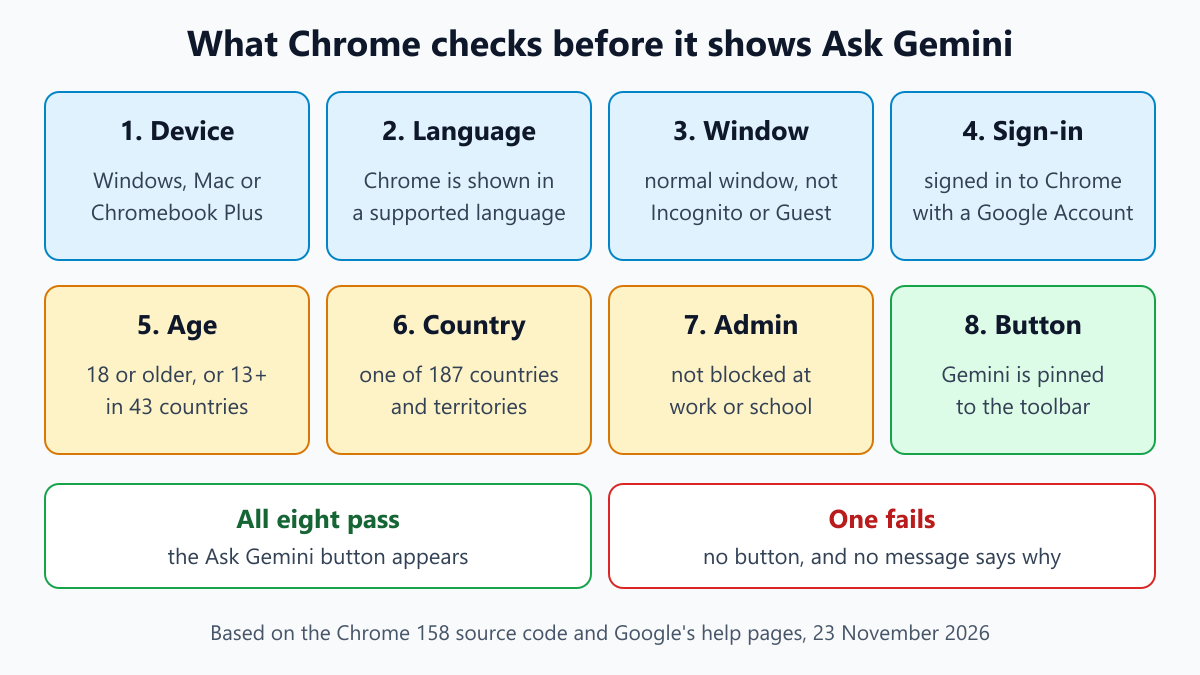
Two things follow from that. A single failed check hides the button, and reinstalling Chrome changes none of the answers.
There is one exception. If you had already opted in to Gemini in Chrome and later fail the country or account check, Chrome 158 keeps the button and shows an error state instead of hiding it.
1. A supported device
Google's help page asks for "a Chromebook Plus, Mac, or Windows computer". The source code agrees. In chrome_features.cc, the main switch for the feature is on by default for Windows, macOS, ChromeOS and Android, and off for everything else.
That is why the button does not appear in Chrome on Linux. The administrator policy for Gemini in Chrome also names Linux only as a future platform.
On ChromeOS there is a second condition: the device must be a Chromebook Plus. An ordinary Chromebook does not qualify, although gemini.google.com still works there in a tab.
2. Chrome's display language
Chrome checks the language that its own menus are shown in. The help page lists 51 supported languages, and the code contains the same 51. Widely used languages that are missing include Arabic, Hebrew, Persian and Urdu.
This catches people in supported countries. Egypt, Saudi Arabia, the United Arab Emirates, Israel and Pakistan are all on the country list. Yet a Chrome that is displayed in Arabic, Hebrew or Urdu will not show the button there.
Where you change the language depends on the system, as Google's language page explains:
- Windows: open Settings, then Languages. Next to the language you want, choose "Display Google Chrome in this language".
- Mac: Chrome uses the system language of the Mac.
- Chromebook: the language is set in the Chromebook's own settings.
Restart Chrome afterwards. The language is checked once, when Chrome starts.
One detail differs between the code and the help page. In the code, Basque, Galician, Icelandic and Zulu are allowed on ChromeOS only. The help page marks only Zulu that way.
3. A normal window
The code accepts only what it calls a regular profile. Incognito windows and Guest windows are not regular profiles, so the button never appears in them. The help page says the same thing in plainer words: the feature "isn't available in Incognito mode".
4. Signed in to Chrome
Being signed in to Gmail in a tab is not enough. Chrome itself must be signed in. You can tell from the top right corner of the window, which shows your account photo or initial when you are. If it shows a plain grey icon, click it and sign in.
On Windows and Mac, the code treats a profile without an account as not capable and hides the button.
If Chrome says that your sign-in is paused, or asks you to verify that it is you, do that first. The code checks that the sign-in is still valid and asks you to sign in again when it is not.
5. Age and account type
Google's availability page has two lists. Adults, meaning people aged 18 or older, can use Gemini in Chrome in 187 countries and territories. Users under 18 can use it in only 43 of them, and the minimum age there is 13 or the age that applies in your country.
The under-18 list includes the United States, Canada, Australia, India, Japan and Pakistan. It does not include the United Kingdom, Brazil, Mexico or South Korea.
I compared both lists with the country codes in glic_enabling.h. They match exactly: 187 and 43.
The age comes from your Google Account, not from Chrome. Chrome asks Google whether the account may use the feature, and hides the button unless the answer is a clear yes. If the birth date on your account is wrong or missing, the help page links to Google's age verification. Parents can also switch the feature off for a supervised child in Family Link.
6. A supported country
On 23 November 2026 the list had 187 countries and territories. It includes the United States, Canada, the United Kingdom, India, Pakistan, Japan, Australia and Brazil, along with most of Africa, Latin America and Southeast Asia.
None of the 27 member states of the European Union is on it. Switzerland, Norway, Iceland, Turkey, Russia and China are missing too. If you live in one of those places, no setting will make the button appear today.
How does Chrome know where you are? It does not use GPS. When Chrome fetches its configuration from Google, the server answers with a two-letter country code. Chrome keeps two values: the latest code, and a stored code that is saved together with the Chrome version number.
According to the variations code, the stored code is kept until Chrome is updated and is then replaced by the latest one. Gemini is allowed when either code is on the list.
That explains three pieces of advice on Google's help page that otherwise look unrelated:
- Turn off your VPN. With a VPN, Google's server sees the country of the VPN, and Chrome records that one. If you use one from our free VPN list, pause it while you test.
- Restart Chrome. Google notes that after travel "your location may not have updated from your previous location".
- Update Chrome. An update replaces the stored code with the current one.
I tried this on my Windows 11 PC with a new, empty Chrome profile. Within 15 seconds, Chrome's settings file held a two-letter country code. It also held the same code stored as a pair with a Chrome version number, as the code describes.
7. Work, school and managed browsers
With a work or school account, an administrator decides. Google's administrator page says the feature is controlled by the Gemini app setting in the Admin console and by a Chrome policy named GeminiSettings. It adds that access "requires both to be enabled". Work accounts must also belong to someone aged 18 or over.
You can see what applies to you in three steps, taken from Google's page on managed browsers:
- Open the Chrome menu. "Managed by your organization" at the bottom means the browser is managed.
- Type chrome://management in the address bar for details.
- Type chrome://policy and look for GeminiSettings. In the policy definition, 1 means "Do not allow Gemini integrations" and 0 means allowed.
On my own PC, chrome://management answered "Your browser is not managed".
You cannot override an administrator. Ask your IT team. If the block comes from your work account, a separate Chrome profile with a personal account is judged on its own. If the whole computer is managed, the policy can apply to every profile.
8. A hidden button and a missing Settings page
Passing every check still leaves two ways to miss the feature.
First, the button can be unpinned. The help page gives the path: Settings, then AI innovations, then Gemini in Chrome, then "Show Gemini at the top of the browser". A right-click on the top edge of the Chrome window offers Pin Gemini as well.
Second, that Settings page is not there for everyone. In Chrome 158 it is shown only after you have opted in. A comment in the settings code says its visibility "can change based on the user accepting the FRE", the first-run screen of the feature.
So if you have never used Gemini in Chrome, a missing Settings page is normal. In my signed-out test profile, the address chrome://settings/ai/gemini simply led back to the main Settings page. Click Ask Gemini first and follow the opt-in. The page appears after that.
Update Chrome, then reset flags
Google's troubleshooting list ends with two general steps.
Update Chrome. Open the menu, choose Help, then About Google Chrome. Chrome checks for updates on that page. On 23 November 2026 the stable version for Windows and Mac was 158.0.8127.37.
An update is only applied when Chrome restarts. My PC was a good example. Chrome had been left open, so it was still running version 157 while the update to 158 sat downloaded and waiting. For this problem an update matters twice: it brings new code, and it refreshes the stored country.
Reset flags. If you once changed settings on the chrome://flags page, Google's flags page tells you how to undo it: open chrome://flags, select Reset all, then relaunch.
What does not help
- Reinstalling Chrome or clearing the cache. None of the eight answers is stored there.
- Turning on flags. The main switch is already on by default on Windows and Mac. Some guides name a flag called glic-side-panel, which is not in the flag list of Chrome 158. Google's own page says flags "aren't settings".
- Editing the entry is_glic_eligible. Some guides tell you to open Chrome's Local State file and change this entry to true. Chrome writes that entry itself from the result of its checks. It is a result, not a switch.
- Editing the country code in the same file. I did not test this and do not recommend it. Chrome rewrites the latest code whenever Google's server sends a new one, and the account check is separate.
Android and iPhone
The rules on phones are different, and tighter on Android.
For Android, the help page asks for an adult account, a phone with at least 4 GB of RAM and Android 12 or higher. In the Chrome 158 code, the default country list for Android has only the United States and India, and the default languages are US and UK English. Google's administrator page speaks of "an Android device in the U.S.".
For iPhone and iPad, the help page asks for age 13 or older, a supported region, the latest Chrome and a signed-in browser. I did not check the iOS code.
Google can change these defaults from its servers without a Chrome update, so treat them as a snapshot. If the feature is not offered on your phone, the separate Gemini app is one of the options in our list of AI apps for Android.
If it still does not appear
Google says it is releasing Gemini in Chrome gradually. The code still contains a rollout check. In Chrome 158 it is switched on by default, but Google can change it remotely, so I cannot rule it out for your account.
If all eight checks pass, install each Chrome update as it arrives and look again. Until then, the Gemini website works in any tab, and our Google Gemini guide shows what it can do. For browsers that build in an assistant in other ways, see the comparison of AI browsers.
Frequently Asked Questions
Why is Gemini not showing in Chrome?
Because one of Chrome's conditions is not met. You need Windows, macOS or a Chromebook Plus, Chrome displayed in a supported language, a normal window that is signed in to Chrome, an account that is old enough, a supported country and no administrator block. Chrome hides the button without a message when one of them fails.
Is Gemini in Chrome available in the UK and Europe?
On 23 November 2026 the United Kingdom was on Google's list, together with some other European countries such as Ukraine and Serbia. None of the 27 European Union member states was listed, and neither were Switzerland or Norway. Google changes the list from time to time, so check its availability page for the current version.
Why is Gemini in Chrome not in Settings?
In Chrome 158 the Gemini in Chrome page appears in Settings only after you have opted in by clicking Ask Gemini once. Before that, a missing page is normal. If the button is missing as well, the cause is one of the eight checks and not the Settings page.
Does Gemini in Chrome work on Linux?
Not in Chrome 158. Google's help page lists Windows, Mac and Chromebook Plus, and in the source code the feature is switched off by default on Linux. The Gemini website still works in a browser tab on Linux.
Why did Gemini disappear from Chrome after I travelled or used a VPN?
Chrome records a country code that Google's servers send it. A trip or a VPN can change that code to a country that is not supported. Turn the VPN off, restart Chrome and install the next Chrome update, which refreshes the stored code.
How do I enable Gemini in Chrome on a work account?
You cannot do it yourself. An administrator has to allow the Gemini app in the Google Admin console and leave the Chrome policy named GeminiSettings on allow. Ask your IT team. On a personal computer you can use a separate Chrome profile with a personal account.
Verification Notes
The eight checks come from the Chrome source code at version 158.0.8127.37. Google's version history service listed it as the stable release for Windows and Mac on 23 November 2026. I compared the country and language lists in that code with Google's availability page using a script. The results were 187 countries for adults, 43 for users under 18 and 51 languages, with no differences in the country lists.
The hands-on checks ran on Windows 11 with the installed Chrome and empty temporary profiles that were not signed in. They covered the country code in Chrome's settings file, the chrome://management page and the missing Gemini settings page.
I did not test a signed-in account, an account under 18, a managed browser, a Mac, a Chromebook, Android or an iPhone, and there are no screenshots. What Chrome shows after opt-in comes from reading the code. The lists and defaults can change on Google's side at any time, so check the linked pages for today's version.
Sources and Further Reading
- Google Chrome Help: Use Gemini in Chrome, with requirements and troubleshooting steps.
- Gemini Apps Help: Gemini in Chrome availability, with the country and language lists.
- Chrome Enterprise Help: Gemini in Chrome for administrators.
- Google Chrome Help: Chrome flags, Chrome languages and managed browsers.
- Chrome 158 source: eligibility checks, country lists and feature defaults.
- Chrome 158 source: GeminiSettings policy, stored country and settings page.
Share this article
Written by
Ali RehmanAuthor at ByteVerse
A Full Stack Developer and Tech Writer specializing in React.js, Next.js, and modern JavaScript, sharing insights on web development, frontend technologies, backend APIs, and scalable applications.
View all posts