Ollama llama runner process has terminated: Causes and Fixes
What "llama runner process has terminated" and "llama-server process has terminated" mean in Ollama, traced in the Ollama 0.40.19 source on 28 November 2026: how to read the exit status and the captured error, find the full message in the log, and fix each cause.
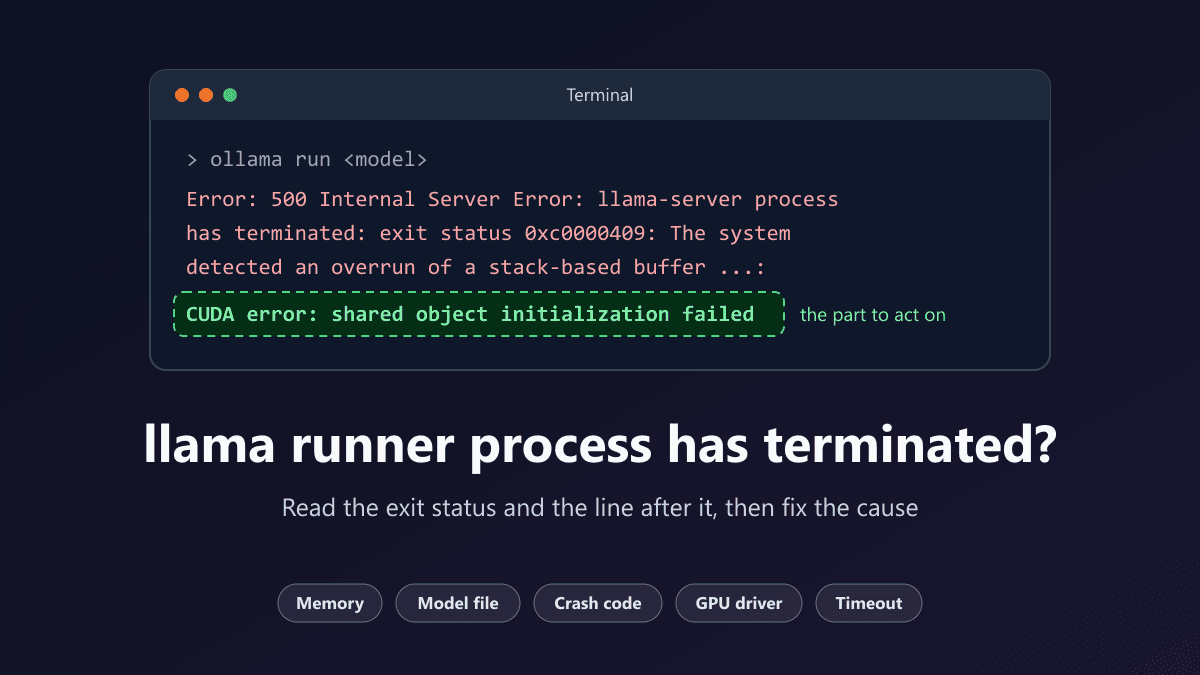
- 1Read the words after process has terminated: the exit status or signal says how the program ended, and the error text Ollama captured from its output is the cause to act on
- 2Since Ollama 0.30.0 the program is llama.cpp's llama-server; a memory failure gets one automatic retry with a smaller automatic context, but a context you set yourself is never lowered
- 30xc0000409 on Windows is a deliberate abort after a failed check or a CUDA error, not an attack, while exit status 2 and the nil ending come only from Ollama 0.24 and older
When Ollama says "llama runner process has terminated", the separate program that loads your model quit before the model was ready. Since Ollama 0.30.0 that program is llama.cpp's own server, so the same failure now reads "llama-server process has terminated". Neither phrase tells you why. The cause is in the exit status and the error line that come after it.
I traced how this message is put together in the source code of Ollama 0.40.19, released on 26 November 2026, and in the older releases whose wording still fills the search results. Ollama is not installed on the PC I used, so no model was loaded for this guide. The Windows texts quoted below come from running the same Windows call that Ollama makes, on Windows 11.
Two errors look similar but have their own guides. If the ollama command cannot reach the server at all, see could not connect to Ollama. If the failure happens while a model is still downloading, it is a pull model manifest error.
Read the message from left to right
This line comes from a report filed in August 2026, GitHub issue #17627. It shows every part of the newer format at once:
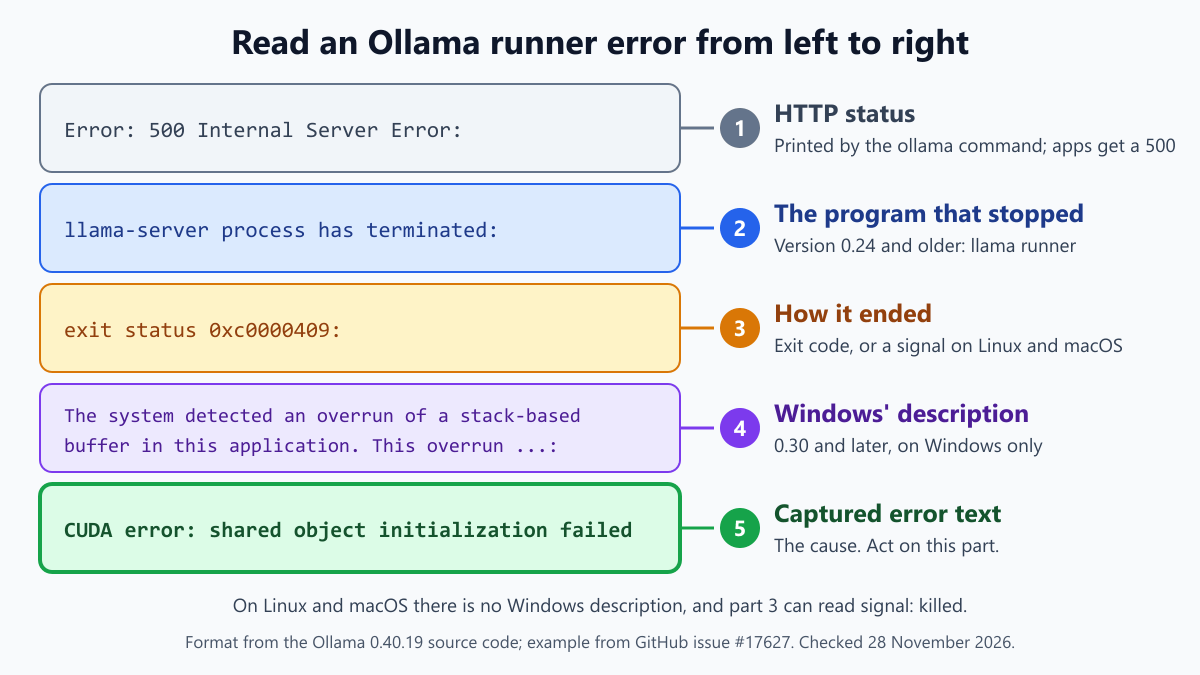
llama-server process has terminated: exit status 0xc0000409: The system detected an overrun of a stack-based buffer in this application. This overrun could potentially allow a malicious user to gain control of this application.: CUDA error: shared object initialization failed
In a terminal, the ollama command prints Error: 500 Internal Server Error: in front of it. Taken piece by piece:
1. 500 Internal Server Error is the HTTP status the Ollama server returned. The command adds "Error:", and apps that use the API receive the same 500.
2. llama-server process has terminated names the program that stopped. Version 0.24 and older say llama runner here.
3. exit status 0xc0000409 is how it ended, as the operating system reported it: an exit code, or on Linux and macOS a signal such as signal: killed.
4. The sentence about a stack-based buffer is Windows' own description of that code. Ollama 0.30 and later insert it on Windows only.
5. CUDA error: shared object initialization failed is the error text Ollama caught in the program's output. This is the part to act on.
To catch that text, Ollama scans everything the program prints. It keeps lines with markers such as error:, CUDA error, ROCm error, cudaMalloc failed, error loading model, GGML_ASSERT or panic:, and lines with phrases like "out of memory" and "failed to allocate".
Every matching line is kept, up to the last 8 KB, so the end of the message can run over several lines. When nothing matched, the message stops at the exit status, and the cause is only in the server log.
Which Ollama version wrote it
| Version | How the message continues |
|---|---|
| 0.22 and older | llama runner process has terminated: and either the last captured line or the exit status, or %!w(<nil>) when the runner ended with exit code 0 |
| 0.23 and 0.24 | llama runner process has terminated: and the captured lines, or the exit status when nothing was captured. Exit code 0 reads llama runner process has terminated with exit code 0 |
| 0.30.0 and newer | llama-server process has terminated:, the exit status, then the captured lines, with Windows' description in between on Windows |
Ollama 0.30.0 moved GGUF models to llama.cpp's server. Its test builds started in May 2026 and the final build is dated 1 June 2026. Pull request #16031, part of that release, says that llama-server "is now the sole inference engine for GGUF-based models". There are no releases numbered 0.25 to 0.29, so 0.24.0 is the last version with the old runner. Run ollama -v to see which one you have.
The difference matters for the diagnosis. Two well-known messages, exit status 2 and "model requires more system memory", belong to the old versions, and advice written for them can send you after the wrong cause on a current install.
Get the full error from the server log
The server log keeps everything the program printed, including the lines Ollama did not capture. Ollama's troubleshooting page lists where it is:
| System | Server log |
|---|---|
| Windows | %LOCALAPPDATA%\Ollama\server.log |
| macOS | ~/.ollama/logs/server.log |
| Linux with systemd | journalctl -u ollama --no-pager |
| Docker | docker logs <container-name> |
ollama serve in a terminal | That terminal |
In 0.30 and later, a failed load leaves three landmarks. starting llama-server shows the full command, including the context size after -c. llama-server terminated records how the program ended, such as an exit code or a signal name, and on Windows the hex code with its description. It is written only when the program printed an error first.
Load failed repeats the final error for every load that fails. Read upward from Load failed to the nearest starting llama-server.
On Windows, this prints those lines together with the five lines above each one:
Select-String -Path "$env:LOCALAPPDATA\Ollama\server.log" -Pattern "starting llama-server","llama-server terminated","Load failed" -Context 5,0
On Linux with systemd:
journalctl -u ollama --no-pager | grep -B 5 -E "starting llama-server|llama-server terminated|Load failed"
For more detail, Ollama's documentation suggests starting the server with OLLAMA_DEBUG=1. Our Ollama GPU guide explains the GPU lines near the start of the same log.
When an app shows only 500. Apps that talk to Ollama, such as Open WebUI, receive a failed load as an HTTP 500 response with the full message in its error field. Each app decides how much of it to show.
To see the whole line, run the same model in a terminal with ollama run <model> "hi", or read the server log. If the terminal run works and the app fails, compare the context length the app asks for.
What each ending means
| Text after "terminated:" | Seen on | What happened | Section |
|---|---|---|---|
cudaMalloc failed: out of memory, failed to allocate, out of memory | All systems | The model and its context did not fit | Out of memory |
signal: killed | Linux, Docker, WSL | The kernel ended it, nearly always for lack of memory | Out of memory |
exit status 1: error loading model: ... | 0.30 and later | llama-server rejected the model file | Model file |
exit status 0xc0000409 and the buffer sentence | Windows | The program aborted itself after a failed check or a CUDA error | Crash codes |
signal: aborted or, on a Mac, signal: abort trap | Linux, macOS | The same abort outside Windows | Crash codes |
| The same error text twice in a row | Linux, macOS, 0.30 and later | A signal ended the program after it printed that error | Crash codes |
exit status 0xc0000005 or signal: segmentation fault | All systems | A real crash on a bad memory access | Crash codes |
exit status 0xc0000135 | Windows | A required DLL is missing | Crash codes |
exit status 0xc000001d | Windows | The processor met an instruction it does not have | Crash codes |
CUDA error: ... or ROCm error: ... not about memory | NVIDIA, AMD | The driver and the bundled GPU code disagree | GPU drivers |
timed out waiting for ... to start | All systems | Loading made no progress for five minutes | Timeouts |
exit status 2 | 0.24 and older | The old Go runner crashed | Older versions |
%!w(<nil>) | 0.22 and older | The runner ended with exit code 0 | Older versions |
Out of memory, including signal: killed
Running out of memory is the most common cause. The captured line reads cudaMalloc failed: out of memory, CUDA error: out of memory, failed to allocate or insufficient memory, and 0.30 and later sometimes say it outright: llama-server reported out-of-memory during startup. On Linux the kernel can also kill the program before it prints anything, which arrives as signal: killed.
What Ollama already tried. Since 0.30.0, Ollama retries a load that ran out of memory, once. If the context length came from Ollama's automatic default, the retry lowers it: anything above 32,768 tokens drops to 32,768, anything above 4,096 drops to 4,096. Other loaded models are unloaded for the retry, and vision models also get a try with their image component on the CPU. The error you see is what failed after all that.
Two things follow from that rule. On a GPU with less than 24 GiB of video memory, the automatic default is already 4,096 tokens, so there is nothing left to shrink. And a context you chose yourself, through OLLAMA_CONTEXT_LENGTH, the num_ctx option or a Modelfile, is never lowered. Ollama treats it as deliberate.
The fixes, cheapest first:
1. Lower the context. In an ollama run session, type /set parameter num_ctx 4096. In API calls, send "options": {"num_ctx": 4096}. To change the default for every request, set OLLAMA_CONTEXT_LENGTH on the server. Ollama's documentation recommends at least 64,000 tokens for coding and agent tools, and a larger context needs more memory, so a model that loads for chat can fail for those tools.
2. Count the parallel slots. Ollama multiplies the context by the number of parallel requests. With OLLAMA_NUM_PARALLEL=4 and 8,192 tokens, llama-server is started with room for 32,768. Left unset, the variable means one slot for llama.cpp models.
3. Free memory. ollama ps lists the loaded models and ollama stop <model> unloads one. OLLAMA_MAX_LOADED_MODELS=1 stops Ollama from keeping several at once. Close games and other programs that use the GPU.
4. Quantize the context cache. OLLAMA_KV_CACHE_TYPE=q8_0 stores the context in about half the memory of the default f16, with a very small loss in precision according to Ollama's FAQ. It needs Flash Attention, which Ollama switches on by itself where the hardware supports it. If Flash Attention ends up off, llama-server refuses to start and the captured line reads llama_init_from_model: quantized V cache requires flash_attn to be enabled.
5. Pick a smaller model or quantization. If nothing above is enough, the model is too large for the machine. The SIZE column in ollama ps shows how much memory a model that does load really uses, which helps you size the next choice.
If the ending is signal: killed. When a Linux machine runs out of memory, the kernel picks a process to sacrifice, stops it with SIGKILL and records the kill in the kernel log. Check for it:
sudo dmesg | grep -i "killed process"
A line with Out of memory: Killed process that names llama-server confirms it. Inside a container with a memory limit, the line says Memory cgroup out of memory instead: the container's limit was reached, not the machine's. Give the container more with docker run -m, or use a smaller model.
WSL and Docker Desktop. Ollama running inside WSL 2, or inside Docker Desktop's WSL 2 engine on Windows, lives in a virtual machine that gets 50% of the PC's memory by default. Raise it with a memory= line under [wsl2] in %UserProfile%\.wslconfig, then run wsl --shutdown. Docker Desktop's own memory setting applies only on Mac, Linux and the Hyper-V backend.
The message from older versions. Ollama 0.24 and older checked memory before starting the runner and could refuse with model requires more system memory (X) than is available (Y). On Windows and Linux it compared the part of the model that would not go to the GPU with free RAM plus free swap.
Version 0.30 dropped that check and simply attempts the load, so a model that does not fit now fails with one of the endings above.
The model file and your Ollama version
When llama-server cannot use a file, it logs the reason, gives up and exits with status 1. On 0.30 and later the message then reads exit status 1: followed by that reason. The one seen most often:
error loading model: unknown model architecture: 'name'
The llama.cpp inside your Ollama does not know that kind of model, so update Ollama. Models from the Ollama library usually stop you earlier, during the download, with a 412 error that asks for a newer version. This ending therefore mostly appears with GGUF files imported from Hugging Face or elsewhere. A brand-new architecture can need a release or two before support arrives.
Versions up to 0.24 replace that line with their own text: this model is not supported by your version of Ollama. You may need to upgrade. The fix is the same.
Other error loading model lines mention a tensor with the wrong shape, a tensor that is not found, or invalid hyperparameters. They mean the file does not match its own description, usually after a damaged download or a bad conversion. For a library model, remove it with ollama rm <model> and download it again with ollama pull <model>. For an imported GGUF, download it again and compare its size and checksum with the source.
Some errors that come before the model starts loading end with Ollama's own advice: "this model may be incompatible with your version of Ollama. If you previously pulled this model, try updating it by running ollama pull <name>". Follow it before trying anything else.
exit status 0xc0000094 on Windows, or signal: floating point exception on Linux, means an integer division by zero inside the program. In early June 2026, gemma4:12b on 0.30.4 builds ended this way on Windows (#16479) and on Linux (#16495), and both reports were closed within a day. Update Ollama first.
Crash codes: 0xc0000409, aborted and segmentation fault
0xc0000409 is not a buffer overrun. The Windows text attached to this code sounds alarming, but the name is historical. Microsoft's documentation of __fastfail says user-mode fail fast requests appear as an exception with code 0xC0000409. Raymond Chen of Microsoft explains that abort() in the C runtime takes this route, and that the code "doesn't actually mean that there is a stack buffer overrun". Nobody attacked your PC.
llama.cpp calls abort() on purpose in two common situations. A failed internal check, GGML_ASSERT, prints GGML_ASSERT(...) failed and aborts. A CUDA error prints CUDA error: ..., the AMD build prints ROCm error: ..., and both abort the same way. That is why 0xc0000409 so often arrives with a CUDA line after it, as in the report at the top. Fix what that line says.
Microsoft also documents that abort() can end a Windows program with exit code 3 instead, so exit status 3 belongs to the same group.
On Linux and macOS the same abort arrives as a signal: signal: aborted on Linux or signal: abort trap on a Mac, with (core dumped) when the system saved a crash dump. You see the signal name only when nothing was captured first. If the program printed an error before the signal, Ollama 0.30 and later repeat that error and leave the signal out, as in issue #18924:
llama-server process has terminated: GGML_ASSERT(hparams.is_swa_any()) failed: GGML_ASSERT(hparams.is_swa_any()) failed
The repeat comes from the way Ollama builds the message. It is one failure, not two, and the llama-server terminated line in the server log still names the signal.
Other Windows codes. Ollama 0.30 and later ask Windows for its description of a crash code with FormatMessage, but pass no values for Windows to fill in. On an English Windows 11 PC, that call returns these texts, shown here without their line breaks. Two of them come out garbled for exactly that reason:
| Code | Microsoft's name | Text after the code | Usual meaning |
|---|---|---|---|
0xc0000409 | STATUS_STACK_BUFFER_OVERRUN | The system detected an overrun of a stack-based buffer in this application. This overrun could potentially allow a malicious user to gain control of this application. | A deliberate abort, so read the next line |
0xc0000005 | STATUS_ACCESS_VIOLATION | The instruction at 0xp referenced memory at 0xp. The memory could not be s. | A real crash, often in GPU code |
0xc0000135 | STATUS_DLL_NOT_FOUND | The code execution cannot proceed because hs was not found. Reinstalling the program may fix this problem. | A DLL is missing, and its name was lost as "hs" |
0xc000001d | STATUS_ILLEGAL_INSTRUCTION | {EXCEPTION} Illegal Instruction An attempt was made to execute an illegal instruction. | The processor lacks an instruction the code uses |
0xc0000094 | STATUS_INTEGER_DIVIDE_BY_ZERO | {EXCEPTION} Integer division by zero. | A division by zero, covered in the model file section |
The texts match what real reports show: #16479 quotes exit status 0xc0000094: {EXCEPTION} followed by Integer division by zero. on the next line, and the garbled "0xp" sentence appears in several 2026 issues.
What to do about them. For 0xc0000005 and signal: segmentation fault, update Ollama and the GPU driver, then load the model once on the CPU as described in the next section. Reports of these crashes in 2026 involved the Vulkan backend on AMD cards (#18557) and CPU-specific libraries on some cloud servers (#17249, #17205).
On Windows, also install the latest Microsoft Visual C++ Redistributable for x64. In report #17375, Ollama's CUDA library picked up an old system copy of msvcp140.dll and crashed with 0xc0000005 while Ollama looked for GPUs, so Ollama fell back to the CPU. The reporter fixed it by updating that runtime.
For 0xc0000135, the name of the missing file is exactly what the garbled text drops. Reinstalling Ollama and the Visual C++ runtime puts the common DLLs back. 0xc000001d means the code used an instruction the processor does not have; one report came from Windows on ARM (#7266).
If the crash began after a settings change. A quantized context cache has crashed some models while they load. GPT-OSS did it on 0.30.6 (#16946), and the reporter saw it gone by 0.34.2. phi4 does it on Apple Silicon (#19905), still open on 28 November 2026. Remove OLLAMA_KV_CACHE_TYPE and try again. If you installed the Homebrew formula and run brew services start ollama, that service sets OLLAMA_KV_CACHE_TYPE=q8_0 and OLLAMA_FLASH_ATTENTION=1 for you.
GPU driver and library errors
When the captured line starts with CUDA error or ROCm error and is not about memory, the GPU driver and the GPU code bundled with Ollama disagree. NVIDIA's documentation explains three messages that appear in Ollama reports.
PTX compiled with an unsupported toolchain. The full text is the provided PTX was compiled with an unsupported toolchain. The GPU code is newer than your driver can handle, so update the NVIDIA driver. Report #17012 is an example.
No kernel image. no kernel image is available for execution on the device means the build contains no code for your GPU's architecture.
Shared object initialization failed. A GPU library could not start, as in the report at the top of this guide.
Ollama's hardware page asks for an NVIDIA card of compute capability 5.0 or higher with driver 550 or later, and driver 570 or later for compute capability 5.0 to 6.2. AMD cards need a ROCm 7 driver, on Linux and on Windows.
To prove the GPU is the trigger, load the model once without it. In an ollama run session, type /set parameter num_gpu 0 before your prompt. Ollama then starts llama-server with -ngl 0, which keeps every layer on the CPU. If the model loads that way, the file and the memory are fine and the problem sits in the driver or the GPU code. The GPU guide covers supported cards and driver checks.
Timed out waiting for the runner to start
The wording is timed out waiting for llama runner to start up to 0.24 and timed out waiting for llama-server to start from 0.30. Either way, the load stopped making progress. Ollama allows OLLAMA_LOAD_TIMEOUT for that, five minutes by default, and restarts the clock whenever the load shows activity, so a slow but steady load is not cut off.
If the line ends in context canceled, usually in the server log, the app or terminal that asked for the model gave up first, and Ollama abandoned the load. Let the first load finish, or raise the app's own timeout. Older versions also print a progress value, and progress 0.00 means the runner never reported any progress at all.
Otherwise, look at three common causes: model files on a slow disk or a network drive, too little free memory, which forces swapping, and a GPU driver that hangs. If you moved your models to a hard disk, our guide to the Ollama models folder shows how to move them to a faster drive. Set OLLAMA_LOAD_TIMEOUT to a longer value such as 15m only after ruling those out.
Older versions: exit status 2 and %!w(<nil>)
exit status 2. Up to 0.24, the runner was Ollama's own program, started a second time with its runner command. It is written in Go, and Go's documentation says that a program which fails with an unrecovered panic prints a stack trace "and then exits with exit code 2". A crash inside the llama.cpp code it called ended the same way.
Report #12314, for example, shows fatal error: fault and [signal SIGSEGV: segmentation violation ...] above the goroutine traces. So on an old version, exit status 2 means "the runner crashed", and the reason is in that trace in the server log. Since 0.30 the process is llama.cpp's server, written in C++, so the Go explanation no longer applies. Update first, because the engine itself changed.
%!w(<nil>). This is how Go prints an error that is missing. Up to 0.22, Ollama formatted the runner's exit result without checking it, so when the runner ended with exit code 0, the message became llama runner process has terminated: %!w(<nil>). A report from an Apple M5 on 0.21.2 (#15849) shows it.
From 0.23, Ollama shows the captured line when there is one and with exit code 0 when there is not. Either way, the reason is only in the server log.
Before you ask for help
If none of the above fits, a report with these details gets useful answers faster.
Versions and hardware. The output of ollama -v, your operating system, your GPU and its driver version, and the model and tag from ollama list.
What you tried. Whether a smaller tag of the same model loads, whether it loads after /set parameter num_gpu 0, and every OLLAMA_ variable you set, especially for context, parallel requests and the cache type.
The evidence. The whole error line, not only "500", and the server log from starting llama-server down to Load failed.
Search Ollama's GitHub issues for both wordings, "llama runner process has terminated" and "llama-server process has terminated", together with your exact ending.
Frequently Asked Questions
What does llama runner process has terminated mean?
It means the helper program that Ollama launches to load a model quit before the model was ready to answer. The words after it say why: an exit status or signal from the operating system, and often the error text the program printed. Running out of memory is the most common cause, followed by model files your version cannot load and GPU driver problems.
Why does my error say llama-server instead of llama runner?
From version 0.30.0, finished in June 2026, Ollama no longer uses its own runner for GGUF models and starts the server program from llama.cpp instead. The failure and the fixes are the same. Newer versions also show the exit status and the captured error text together, and on Windows they add Windows' own description of the exit code.
What does exit status 0xc0000409 mean in Ollama?
On Windows it usually means the program stopped itself on purpose. The C runtime's abort routine ends a process through a fail fast with this code, and llama.cpp calls abort after a failed internal check or a CUDA error. The warning about a stack buffer overrun is a historical name for the code, not a sign of an attack. Read the line that follows it.
Does signal killed mean Ollama ran out of memory?
On Linux, almost always. When memory runs out, the kernel picks a process to stop, ends it with a kill signal and writes a Killed process line to the kernel log, which you can check with dmesg. In a container the line mentions a memory cgroup, which means the container's own limit was reached.
How do I fix exit status 2 in Ollama?
Exit status 2 comes from Ollama 0.24 and older, where the runner was a Go program and a crash in it ended with code 2. Update Ollama first, because newer versions use a different engine and report a more specific reason. Until then, the panic or fatal error text in the server log names the crash.
Does reinstalling Ollama fix this error?
Only when the error is about a missing file, such as exit status 0xc0000135 on Windows, or after an update left mismatched files behind. Memory problems, model files your version cannot read and driver errors stay the same after a reinstall. Read the line after the exit status first and fix that cause.
Why does the error show the same text twice?
On Linux and macOS, when a signal such as an abort ends the program after it printed an error, Ollama 0.30 and later repeat the captured error text and leave the signal name out. It is one failure, not two. The server log line for the terminated program still names the signal.
Why does Open WebUI only show a 500 error?
The Ollama server reports a failed model load as HTTP status 500 and puts the full message in the response, and each app decides how much of it to show. Run the same model in a terminal with ollama run, or open the Ollama server log, to see the whole line. If it works in the terminal, compare the context length the app requests.
Why does Ollama say timed out waiting for the runner to start?
The model load made no progress for the load timeout, five minutes by default, or the app that asked gave up first, which adds context canceled to the message. Slow disks, too little memory and GPU driver hangs are the usual causes. Raising the timeout helps only when loading is slow but steady.
Verification Notes
The message formats, the captured markers, the retry rules and the timeout come from the Ollama 0.40.19 source code, the newest release on 28 November 2026. For the older wordings I compared the same code in releases from 0.12.11 to 0.24.0, and I found the version boundary by comparing releases from 0.12.11 to 0.40.19. The llama.cpp details come from tag b12734, the version that Ollama 0.40.19 builds.
The 0.30.0 release page on GitHub is dated 13 May 2026, but test builds ran from 7 May and the v0.30.0 tag points to a build from 1 June 2026, so this guide says June. The Homebrew settings come from the Homebrew formula as published on 28 November 2026.
The Go behavior comes from Go's documentation and from the source of Go 1.26.10, the version named in Ollama's build file. The Windows texts were produced on Windows 11 Pro, build 26300 in English, on 28 November 2026, with the same FormatMessage call and settings that Ollama's Go library uses. Other languages or Windows builds may word them differently.
Ollama was not installed for this article, so no model was loaded and there are no screenshots. I did not run the Linux and Docker commands. The real messages are quoted from the GitHub issues linked below, and anything Microsoft, NVIDIA or the Linux kernel says about a code comes from their own documentation or source.
Sources and Further Reading
Ollama documentation: Troubleshooting, with log locations, FAQ, with context, parallel requests and cache type, Context length and Hardware support.
Ollama 0.40.19 source: llama-server wrapper, captured error lines, Windows exit codes, scheduler and retries and settings.
Older Ollama source: 0.24.0 runner and 0.22.0 runner. The change: Ollama 0.30.0 release and pull request #16031.
llama.cpp b12734: ggml_abort, CUDA error handler, server exit codes and context checks.
Go: runtime package documentation, ProcessState.String and fmt error output.
Microsoft: __fastfail, abort, NTSTATUS values, Raymond Chen on STATUS_STACK_BUFFER_OVERRUN, Visual C++ Redistributable downloads and WSL settings.
Linux kernel: OOM killer overview and oom_kill.c.
Docker: resource constraints, Docker Desktop settings and WSL 2 backend.
Homebrew: Ollama formula.
NVIDIA: CUDA Runtime API error codes.
GitHub issues quoted above: #17627, #16479, #16495, #18924, #17012, #12314, #15849, #18557, #17375, #17249, #17205, #7266, #16946 and #19905.
Share this article
Written by
Ali RehmanAuthor at ByteVerse
A Full Stack Developer and Tech Writer specializing in React.js, Next.js, and modern JavaScript, sharing insights on web development, frontend technologies, backend APIs, and scalable applications.
View all posts